23

enter image description hereI have added some vertex paint and would like to see it in the render.

It looks simple enough on all the tutorials, except I don't have those options available; Having spent hours researching I am still lost, how can this be done?

All Material options expanded

gandalf3
  • 157,169
  • 58
  • 601
  • 1,133
Mikolajki
  • 233
  • 1
  • 2
  • 5
  • This is my 1st project so I am not sure what you are asking? I have got quite far using tutorials but now I do not have the same options for enabling the vertex paint as the tutorial. – Mikolajki Dec 02 '14 at 19:34
  • I set to cycles render on one of the 1st tutorials AJWood – Mikolajki Dec 02 '14 at 19:36
  • 1
    I would send a full screen grab if there was an option? I may have to edit the question to add an image? I promise it's been set to cycles render throughout. Can you talk me through what I need to change here – Mikolajki Dec 02 '14 at 19:51
  • I'd suggest editing your question with a full screenshot. Perhaps also save and post the resulting .blend file – ajwood Dec 02 '14 at 19:53
  • Related: http://blender.stackexchange.com/q/14262/599 – gandalf3 Dec 02 '14 at 20:36
  • Ajwood summed it up well, but I personally recommend forgoing vertex paint all together and using uv texture painting. It's fast and has a better resolution. Press "u", unwrap light pack, add image in image editor, and go into texture painting mode in the 3d view. –  Dec 03 '14 at 03:21
  • @Caleb, yeah.. I find it tough to know whether to answer to question or tell them they asked wrong question. Maybe address the question in one answer, and put the "what you actually should be doing is..." in a separate answer? I bet there is a SE-meta question which addresses that.. – ajwood Dec 03 '14 at 15:15

1 Answers1

32

You should plug your vertex colors into the color input of your shader.

  1. With your object selected, add a new material:

enter image description here

  1. Create a meaningful name for the new material. Next, open a node editor window. One way to do this is to create a new UI window by dragging up the triangle in the bottom-left of an existing widow:

enter image description here

You can change the type of your new window with the button on the bottom-left -- select "Node Editor"

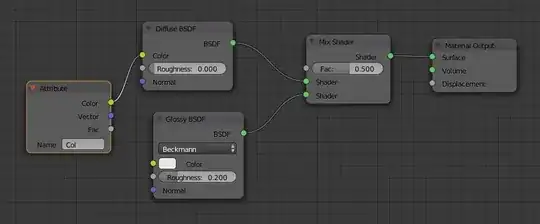
enter image description here

  1. You have to type the name of your vertex color layer into the Attribute node. The default name is Col:

enter image description here

You can check the name of vertex color layer in the Vertex Color section of the Object Data tab in the Properties panel:

enter image description here

ajwood
  • 10,063
  • 11
  • 60
  • 112