2

I am a self-taught Mathematica user, trying to make some progress. This is my code:

Manipulate[
  Solve[
    {(p1 a1 + p2 .2) (1 + r) + w 1 == p1, (p1 .1 + p2 .4) (1 + r) + w 30 == p2}, 
    {p1, p2}], 
  {r, 0, .45}, 
  {a1, 0, .6}]

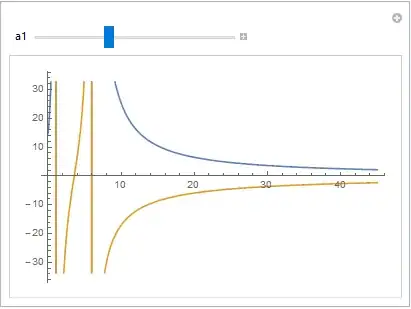
I can get the manipulate-sliders for r and a1. However, I haven´t been able to integrate the plot and the manipulate functions/commands in order to get a two-dimensional plot for p1 and p2 (y-axis) as a function of r (x-axis) while manipulating the values of a1.

m_goldberg
  • 107,779
  • 16
  • 103
  • 257
HML1959
  • 21
  • 4

2 Answers2

4

You haven't defined w, so I give it an arbitrary value:

w = 1; 
Manipulate[
  sol = {p1, p2} /. 
       Solve[{(p1 a1 + p2 .2) (1 + r) + w 1 == p1, 
              (p1 .1 + p2 .4) (1 + r) + w 30 == p2}, {p1, p2}];
  Plot[sol, {r, 0, 045}], 
  {a1, 0, .6}
]

Mathematica graphics

Sjoerd C. de Vries
  • 65,815
  • 14
  • 188
  • 323
0

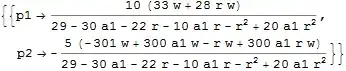
The problem you are feeding Solve has a unique solution and it would be most efficient to solve it once and then feed the result into Manipulate.

Solve[
 {
  (p1 a1 + p2/5) (1 + r) + w == p1,
  (p1/10 + 2 p2/5) (1 + r) + 30 w == p2},
 {p1, p2}
 ]

Mathematica graphics

To simplify the code a bit it is proposed that functions representing p1 and p2 should be defined.

f1[w_, a_, r_] := (10 (33 w + 28 r w))/
   (29 - 30 a - 22 r - 10 a r - r^2 + 20 a r^2)

f2[w_, a_, r_] := -((5 (-301 w + 300 a w - r w + 300 a r w))/
  (29 - 30 a - 22 r - 10 a r - r^2 + 20 a r^2))

Use these in Manipulate with a and w as variables.

Manipulate[
 Plot[{f1[w, a, r], f2[w, a, r]},
  {r, 0, 45},
  PlotStyle -> {Black, Red}
  ],
 {{w, 1}, 0.5, 5, Appearance -> "Open"},
 {{a, 0.1}, 0, 1, Appearance -> "Open"}
 ]

Mathematica graphics

Jack LaVigne
  • 14,462
  • 2
  • 25
  • 37