40

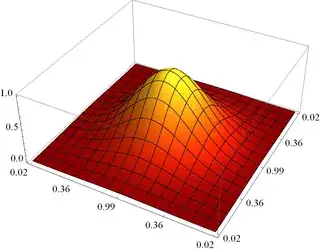
Is it possible? Is it platform specific? Does it rely on the graphics hardware? Why does the antialiasing slider under Preferences > Appearance > Graphics do nothing? I remember seeing some post-plotting solutions years before in MathGroup, but could not find it.

Edit

System is: HP EliteBook 8440p, integrated Intel HD Graphics, running Windows 7, 64bit

Brett Champion
  • 20,779
  • 2
  • 64
  • 121
István Zachar
  • 47,032
  • 20
  • 143
  • 291
  • The slider works as advertised under OS X, so it is probably platform- and hardware-specific. – acl Jan 18 '12 at 19:12
  • @acl It is hardware-specific, it's just that Macs always come with good enough graphics hardware. – Szabolcs Jan 18 '12 at 19:27

3 Answers3

42

This needs specific support from your graphics card. My own graphics card is very old, and does not support it, so the slider does nothing on my machine.


But the good news is that there are workarounds, and I even made an antialiasing palette (code at the end of the post -- evaluate it, pop out the palette, and if you prefer, save it using Palettes -> Install Palette...).

This is the core antialiasing function I use:

antialias[g_, n_: 3] := 
  ImageResize[Rasterize[g, "Image", ImageResolution -> n 72], Scaled[1/n]]

It simply renders a large image, and it downscales it. The results can be better than with a better graphics card's built-in antialiasing, so it's worth a look even if you have a good graphics card.

Problems with this method:

  • Fonts can be blurrier than what you'd like

  • With a high scaling factor, it may expose bugs in your graphics driver, and show some unusual results (I had problems with opacity in more complex graphics)

  • Tick marks don't scale properly (I think this is a bug), so they are barely visible on the antialiased version.


This is the palette code. Usage: select a 3D graphic and press the button. It'll insert an antialiased image below.

Begin["AA`"];

PaletteNotebook[DynamicModule[
  {n = 3},
  Column[{
    SetterBar[
     Dynamic[n], {2 -> "2\[Times]", 3 -> "3\[Times]", 
      4 -> "4\[Times]", 6 -> "6\[Times]"}, Appearance -> "Palette"],
    Tooltip[
     Button["Antialias", antialiasSelection[SelectedNotebook[], n], 
      Appearance -> "Palette"], 
     "Antialias selected graphics using the chosen scaling factor.\nA single 2D or 3D graphics box must be selected."]
    }],
  Initialization :> (
    antialias[g_, n_Integer: 3] := 
     ImageResize[Rasterize[g, "Image", ImageResolution -> n 72], 
      Scaled[1/n]];

    antialiasSelection[doc_, n_] := Module[{selection, result},
      selection = NotebookRead[doc];
      If[MatchQ[selection, _GraphicsBox | _Graphics3DBox],
       result = 
        ToBoxes@Image[antialias[ToExpression[selection], n], 
          Magnification -> 1];
       SelectionMove[doc, After, Cell];
       NotebookWrite[doc, result],

       Beep[]
       ]
      ]
    )
  ],
 TooltipBoxOptions -> {TooltipDelay -> Automatic}, 
 WindowTitle -> "Antialiasing"
 ]

End[];

Demonstration:
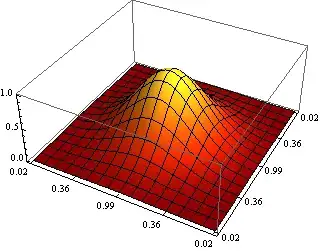
Mathematica graphics Mathematica graphics

Szabolcs
  • 234,956
  • 30
  • 623
  • 1,263
  • 1
    @István, this time I have included the tooltips, so you can see that I'm listening :D – Szabolcs Jan 18 '12 at 19:28
  • Many thanks, I really appreciate it! An informative gui is a good gui. – István Zachar Jan 18 '12 at 20:26
  • I wonder, can this code be applied in a post-way to Graphics3D objects automatically? Would that be too resource-consuming? – István Zachar Jan 18 '12 at 20:39
  • @István If we did that, Graphics3D objects would not be rotatable any more. But yes, I guess we could do that: render[g_Graphics3D] := antialias[g]; render[x_] := x; $PrePrint = render. (This needs improvement of course to handle Graphics3D inside List/Row/Column, etc., but it's enough to try if you like it.) – Szabolcs Jan 18 '12 at 20:42
  • No, I was asking whether it is possible to postprocess Graphics3D and still maintain it in full 3D (rotateable). Now I know the answer, and that concludes our session. And the Oscar goes to.... – István Zachar Jan 18 '12 at 21:33
  • @Nasser Thanks! I only use this for final images. I guess if my graphics hardware were powerful enough to handle rotation using this method, and it would support antialiasing without a hack like this. This is really just a workaround for those of us with very old integrated graphics hardware. – Szabolcs Jan 20 '12 at 17:41
  • A lovely solution! However, there is a limitation that lines (like the box around the plot and the ticks on the axes) become much fainter, because they remain one pixel wide in the large image. Would it be possible to automatically scale up all line thicknesses in your code? –  May 20 '14 at 12:29
  • @RahulNarain There are several limitations, not just that (e.g. ticks don't scale the way they should) ... I don't know if it's possible to do that reliably and automatically. To be honest, I doubt it ... In fact I think that the line widths are correct and the problem only comes up when a line is thinner than 1 pixel (in which case it always gets rounded up to 1 pixel for the current resolution). If you investiage this further and arrive at a good solution, let me know. – Szabolcs May 20 '14 at 12:34
21

If you're running Mathematica in Linux, 3D antialiasing can be a bit tricky. Asking Wolfram support for a workaround, I got the following as an answer:

Unfortunately, anti-aliasing is not officially supported in the Mathematica front-end on Linux at this time. However, you may be able to enable it by setting the MATHEMATICA_GL_FBO environment variable to 1. Here is how to do this in bash:

export MATHEMATICA_GL_FBO=1

This should work on most late-model NVIDIA GPUs, assuming that you are using the proprietary NVIDIA drivers.

Note that the support also told me this is an experimental feature, but I have never experienced any problems with it, and am now using it for almost a year. I think worst case is it isn't supported by your graphics card and the workaround does nothing.

If you want to execute this command automatically when starting Mathematica, open /usr/local/bin/mathematica (or wherever you installed your executable to) and add the line at the very top. This is what my file looks like:

#!/bin/sh

# Linux antialiasing workaround, suggested by Wolfram support:
export MATHEMATICA_GL_FBO=1

#  Mathematica 8.0 Front End command file
#  Copyright 1988-2010 Wolfram Research, Inc.
#  Make certain that ${PATH} includes /usr/bin and /bin
PATH="/usr/bin:/bin:${PATH}"

...
David
  • 14,911
  • 6
  • 51
  • 81
9

If moving the slider doesn't have any visible effect on the graphic inside the preferences dialog, then 3D antialiasing is probably not supported on your computer. The level of support depends mainly on the graphics card and operating system. If you tell us more details, we might be able to say more.

I also know of situations where antialiasing works for opaque scenes, but turns off when there's transparency, but that doesn't sound like that's the case here.

Brett Champion
  • 20,779
  • 2
  • 64
  • 121
  • I can confirm that antialiasing doesn't work when transparency is involved. One can see that it effects the axes but not the object. – Dror Mar 30 '12 at 12:51
  • @Dror This will depend on your system, and you may get better results from using the BSPTree: http://mathematica.stackexchange.com/a/190/ – Brett Champion Mar 30 '12 at 16:11