I have an application using InputField to allow a user to dynamically update a data structure. In some cases the user will want to remove a string from one field and paste it into another. If this is done using cut and paste everything works okay, and the underlying data updates to reflect what is seen in the GUI. However, if the string is moved using drag and drop, the Dynamic in the source field does not appear to register the change of contents, although the destination field works as expected.
Here's an example:
test = {"string", ""};
Column[{
  InputField[Dynamic[test[[1]]], String],
  InputField[Dynamic[test[[2]]], String],
  Dynamic[test]
  }]
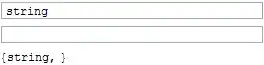
If I now drag and drop the string from the upper field into the lower field I get this:

The upper input field is now empty but test[[1]] still contains "string". This is a problem, because normally the Dynamic[test] line won't be there so the user relies on the input fields to correctly show the actual contents of test.
How can I fix this?


ContinuousAction->Truedoes not work too, does it"? – Kuba Sep 09 '13 at 11:52ContinuousActionfixes it. Please consider posting that as an answer. – Simon Woods Sep 09 '13 at 12:05EventHandlerwrapper to handle"MouseDragged"failed to identify drag-and-drop events, so I would say this is another GUI functionality that cannot be handled correctly from within Mathematica, just like focusgain/loss, key release, etc. – István Zachar Sep 09 '13 at 13:15