355

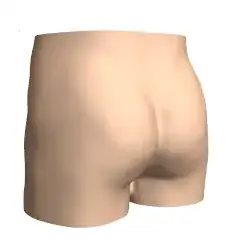
I'm trying to develop a function which 3D plot would have a buttocks like shape.

Several days of searching the web and a dozen my of own attempts to solve the issue have brought nothing but two pitiful formulas below.

They have some resemblance to the shape I want, though not quite.

Could you help me to obtain a proper formula?

Here are those bad solutions I've got myself:

ParametricPlot3D[{Sin[y] Sqrt[1 - (Abs[x] - 1)^2], 
  Cos[y] Sqrt[1 - (Abs[x] - 1)^2], x}, {x, -10, 10}, {y, -3 Pi, 3 Pi},
  AspectRatio -> Automatic] 

Mathematica graphics

and the following:

Plot3D[((2 Sqrt[30 - x^2 - 2^-x]/3) + Sqrt[1 - (Abs[y] - 1)^2])/2,
   {x, -7, 7}, {y, -7, 7}, AspectRatio -> Automatic]

Mathematica graphics

Alexey Popkov
  • 61,809
  • 7
  • 149
  • 368
Simpleton Jack
  • 3,013
  • 3
  • 12
  • 11

6 Answers6

556

I have to confess that I see this as a proper challenge, as I am usually quite creative in finding/combining functions to provide a desired behavior. So I will give it another try.
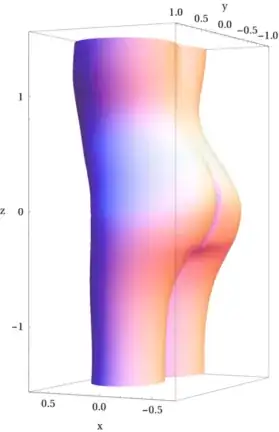
Mathematica graphics

which is generated using

box[x_, x1_, x2_, a_, b_] := Tanh[a (x - x1)] + Tanh[-b (x - x2)];
ex[z_, z0_, s_] := Exp[-(z - z0)^2/s]

(*and*)

r[z_, x_] := (*body*).4 (1.0 - .4 ex[z, .8, .15] + 
Sin[2 π x]^2 + .6 ex[z, .8, .25] Cos[2 π x]^2 + .3 Cos[2 π x]) 0.5 (1 + Tanh[4 z]) +
(*legs*)
(1 - .2 ex[z, -1.3, .9]) 0.5 (1 + Tanh[-4 z]) (.5 (1 + Sin[2 π x]^2 +
 .3 Cos[2 π x])*((Abs[Sin[2 π x]])^1.3 + .08 (1 + Tanh[4 z])  )  ) +
(*improve butt*)
.13 box[Cos[π x], -.45, .45, 5, 5] box[z, -.5, .2, 4, 2] - 
0.1 box[Cos[π x], -.008, .008, 30, 30] box[z, -.4, .25, 8, 6] - 
.05 Sin[π x]^16 box[z, -.55, -.35, 8, 18]

(*and finally*) 

ParametricPlot3D[
(*shift butt belly*)
{.1 Exp[-(z-.8)^2/.6] - .18 Exp[-(z -.1)^2/.4], 0, 0} + {r[z, x] Cos[2 π x], r[z, x] Sin[2 π x],z}, 
{x, 0, 1}, {z, -1.5, 1.5},
PlotPoints -> {150, 50}, Mesh -> None,
AxesLabel -> {"x", "y", "z"}]

Edit What was the strategy in generating the graph (answering the comment of @mcb)

Inspired by some of the solutions here and the fact that the original question seems to head direction Plot3D[] or ParametricPlot3D[], the idea is to use a cylinder as base. I remembered from other work that a parametric curve of type 1+Cos[t] gives something butt-shaped and 1+ a Cos[t] can give something like a torso cross section. To make it a little bit more elliptical I added a 1+Sin[t]^2type. Combining this already goes in the right direction.

Legs are also not very complicated. Just fold the cylinder into two by,e.g, Abs[Sin[t]]. To make the transition from legs to torso I use a soft step based on Tanh[].

Next step is to push it in and out in the correct way (belly and butt), so there is a shift to the cylinder based on Gaussians.

At the end one adds features like waist, etc. using Gaussians or adjustable smooth box-like functions.

Done, overall not too complicated.
masterxilo
  • 5,739
  • 17
  • 39
mikuszefski
  • 4,877
  • 1
  • 14
  • 18
244

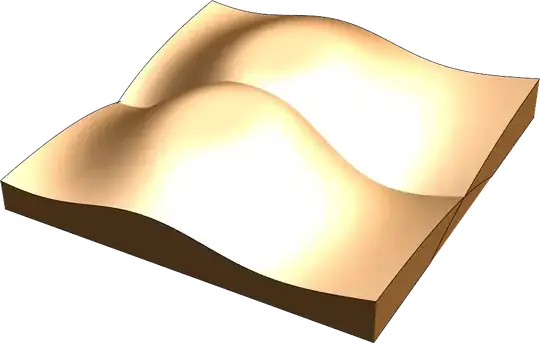
This might get me suspended from the site butt I cannot resist.

The shape you are looking for can probably be approximated (depending how anal you want to be about the outcome) by two assymetric probability distributions. The obvious choices would be a Poasson or a log normal distribution. I will use the latter as it is continuous. Now the bummer is that you have to smoothen them out somehow so I will use an exponential to do that. Since it is the overlap of the two functions that I am interested, I need to add some filling so that the individual sheets don't show (cheeky, I know). I chose Filling->Bottom for that. The final result is shown below (please don't be harse in judging it):

Plot3D[{
  -PDF[LogNormalDistribution[1, 1], (y + .3)^2 + x^2] E^(.8 (y + .7)^2), 
  -PDF[LogNormalDistribution[1, 1], (y - .3)^2 + x^2] E^(.8 (y - .7)^2)
 }, 
 {x, -1.,1.4}, {y, -.9, .9},
 Filling -> Bottom,
 FillingStyle -> Opacity[1],
 PlotStyle -> {Brown, Brown},
 Lighting -> "Neutral",
 Boxed -> False,
 Axes -> False,
 Mesh -> None,
 PlotRange -> {Automatic, Automatic, {-.4, .3}}]

Rendered image of the parametric butt

Cracking!

gpap
  • 9,707
  • 3
  • 24
  • 66
132

Parametric Buttocks Manipulator

Manipulate[
 ParametricPlot3D[{
   (e u^p + (1 + (c - a u) (u - 1)) Cos[t]^2) Sin[t],
   (e u^p + (1 + (d - b u) (u - 1)) Cos[t]^2) Cos[t],
   2 u}, {t, -0.2, Pi + 0.2}, {u, 0, 1.1}, Lighting -> "Neutral", Mesh -> None, 
  PlotStyle -> Directive[Specularity[0], RGBColor[0.92, 0.85, 0.73]], Axes -> False],
 {{a, 7}, 2, 10},
 {{b, 2.5}, 1, 3},
 {{c, -0.5}, -1, 0},
 {{d, -0.5}, -1, 0},
 {{e, 0.7}, 0.5, 1},
 {{p, 2.5}, 1, 5}]

enter image description here

Simon Woods
  • 84,945
  • 8
  • 175
  • 324
70

Scientific progress! In v10.3 with all the goodies in AnatomyData we can now use the simple code:

Entity["AnatomicalStructure", "Skin"]["Graphics3D"]

Mathematica graphics

Zoom in on the appropriate part and you're done.

pelvisLoc = AnatomyData[Entity["AnatomicalStructure", "Pelvis"], "RegionBounds"]; 
Show[
   Entity["AnatomicalStructure", "Skin"]["Graphics3D"], 
   PlotRange -> pelvisLoc, 
   PlotRangePadding -> {33, 33, 19},
   ViewPoint -> {0.961, 1.62, 0.203}, 
   ViewVertical -> {0.109, 0.284, 1.202}
]

Mathematica graphics

Although not parametric, I thought it would be a nice addition to the other answers.

For those at work: I would advise to leave the Viewpoint where it is.

Sjoerd C. de Vries
  • 65,815
  • 14
  • 188
  • 323
36

Well, an unusual question to answer, what about something like this

Plot3D[.7*(1 + Tanh[1 - (2*Y^2 + X^2 + X^4)]) - .3*Exp[-X^2/.0025]*
   Exp[-(Y - .1)^2/.15] - .2*(Exp[-(X - .7)^2/.02]*Exp[-(Y - .0)^2/.08] + 
     Exp[-(X + .7)^2/.02]*Exp[-(Y - .0)^2/.08]), {X, -1, 1}, {Y, -1, 1}]

Mathematica graphics

Öskå
  • 8,587
  • 4
  • 30
  • 49
mikuszefski
  • 4,877
  • 1
  • 14
  • 18
19

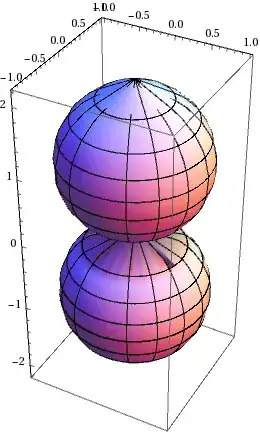
Just a combination of Graphics3D objects

Graphics3D[{Scale[
Cylinder[{{0, 0.9, -0.5}, {2, 0.7, 0.5}}, 0.75], {1, 0.95, 1}],  
Scale[Cylinder[{{0, -0.9, 0}, {2, -0.7, 0}}, 0.75], {1.0, 0.95, 1}],
Scale[Cylinder[{{-1.1, 0, 0}, {-0.3, 0, 0}}, 1.5], {1, 1, 0.5}],
Scale[Sphere[{0., 0.75, -0.25}, 1.05], {1.1, 0.9, 1}],
Scale[Sphere[{0., -0.75, 0.1}, 1.05], {1.1, 0.9, 1}],
Sphere[{-0.2, 0, 0.2}, 0.65],
Scale[Sphere[{-0.4, 0, -0.2}, 1.2], {0.6, 1.3, 0.75}],
}, PlotRange -> All, Boxed -> False, 
Lighting -> ({"Spot", ColorData["SouthwestColors"][RandomReal[]], 
   Scaled[#], {Pi/4, 100}} &) /@ RandomReal[{-4, 4}, {5, 3}]]

enter image description here

yarchik
  • 18,202
  • 2
  • 28
  • 66