0

I am trying to create a table which when exported in a .csv format and opened in MS.Excel has the following form;

i1    j1    f[i1,j1]
i1    j2    f[i1,j2]
i1    j3    f[i1,j3]
i2    j1    f[i2,j1]
i2    j2    f[i2,j2]
i2    j3    f[i2,j3]
i3    j1    f[i3,j1]
i3    j2    f[i3,j2]
i3    j3    f[i3,j3]
...

I have tried;

myTable = Table[{i, j, f[i, j]}, {i, 1, 3}, {j, 1, 3}]
Export["out.csv", myTable]

but it comes out as;

{{{1, 1, f[1, 1]}, {1, 2, f[1, 2]}, {1, 3, f[1, 3]}}, 
 {{2, 1, f[2, 1]}, {2, 2, f[2, 2]}, {2, 3, f[2, 3]}}, 
 {{3, 1, f[3, 1]}, {3, 2, f[3, 2]}, {3, 3, f[3, 3]}}}

Which in MS.Excel looks like;

{i1    j1    f[i1,j1]}    {i1    j2    f[i1,j2]}    {i1    j3    f[i1,j3]}
{i2    j1    f[i2,j1]}    {i2    j2    f[i2,j2]}    {i2    j3    f[i2,j3]}
{i3    j1    f[i3,j1]}    {i3    j2    f[i3,j2]}    {i3    j3    f[i3,j3]}

The 3 sets of nested brackets means it doesn't come out how I wanted it.

I am sure this is a really simple/dumb question but I am a bit lost here.

m_goldberg
  • 107,779
  • 16
  • 103
  • 257
Alex C
  • 25
  • 4
  • if you have a list list={{i1,j1},...,{in,jn}} then this code will form the table you need {Sequence@@#,f@@#}&/@list – k_v Mar 19 '15 at 14:38
  • @m_goldberg Thanks for that. I clearly need to take some time to learn some of the more esoteric syntax. I've just found the Flatten[] function which appears to reduce my table to 2-dimensions which get the result but probably not as elegant or efficient as yours – Alex C Mar 19 '15 at 14:56
  • I think you wanted to address your comment to @k_v. – m_goldberg Mar 19 '15 at 15:12
  • @m_goldberg your right I did, sorry; new here also:) – Alex C Mar 19 '15 at 15:15
  • @k_v thanks for your comment – Alex C Mar 19 '15 at 15:16

2 Answers2

3

I am not sure if you want numbers or functions. Since you are using comma separated variables I have converted your f[i,j] to a string to avoid the comma in the function creating an extra column.

myTable = Table[{i, j, ToString[f[i, j]]}, {i, 1, 3}, {j, 1, 3}]

If you look at the output there is a level of bracketing associated with each table index. You don't want this so we can remove it with flatten

flatTable = Flatten[myTable, 1]

Now use TableForm to check the configuration

TableForm[flatTable]

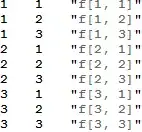
The output is

Mathematica graphics

Now you can export

Export["out.csv", flatTable]    
Hugh
  • 16,387
  • 3
  • 31
  • 83
2

There are many ways to post-process myTable to get rid of the extra nesting.

Look up Apply and Join for this:

Join @@ myTable

With Flatten:

Flatten[myTable, 1]

With the new-in-10 Catenate

Catenate[myTable]

So which one should you use?

Performance wise, they're mostly the same. They all preserve packed arrays. I used to use Join @@ up to Mathematica 9 because I prefer not to have another layers of hard-to-read brackets with Flatten[..., 1]. Since version 10, I use Catenate, e.g. Catenate@Table[..., { }, { }].

Szabolcs
  • 234,956
  • 30
  • 623
  • 1,263