126

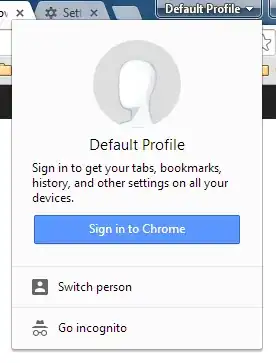
Since Chrome version 38, there's a pretty ugly button in the title bar of the Chrome window that allows you to switch profiles quickly. Since I'm the only one that uses my computer, this is not really useful to me, and I'd rather reclaim the space for more open tabs. I've looked in the settings but don't see a way to disable it. How can I get rid of the button?

Image showing button to switch profile and window that pops up when you click the button

Oliver Salzburg
  • 87,539
  • 63
  • 263
  • 308
jstricker
  • 2,505
  • 3
    This answer should be updated to reflect that the chrome://flags solution no longer works as of Chrome 45. On Windows, the only way to disable it is to use the --disable-new-avatar-menu CLI argument. For OSX, well, there really isn't an easy way. You can try the solutions at http://superuser.com/questions/271678/how-do-i-pass-command-line-arguments-to-dock-items/271697#271697 – RHPT Sep 07 '15 at 01:07
  • @RHPT The answer I accepted back in June (three months ago) is accurate and has the information you mention here. – jstricker Sep 08 '15 at 14:08
  • @jstricker Oops. You're right. I was looking at the most voted answer, which is incorrect. – RHPT Sep 08 '15 at 19:07
  • Work-around: Force Install Chrome 43, then the flag options and argument flags work as before. Copy can be found on filehippo: http://filehippo.com/download_google_chrome/62226/ – Eric Leschinski Dec 17 '15 at 01:56
  • An alternative is install Slimjet from http://www.slimjet.com, a Chromium derivative, which offers a simple option "Show profile switching button on Window caption" to turn on/off this particular button. – Stephen Cheng Jan 21 '16 at 21:48

7 Answers7

89

The following instructions only work for versions of chrome < 44 or version 46:

Disable this via chrome://flags

It's accessible by copy/pasting this URL in the omnibox:

chrome://flags/#enable-new-avatar-menu

Disable it to remove the button.

janv8000
  • 1,628
  • 1
    Thanks a lot. I kept repeatedly hitting this 'new' button (for those of us who don't use a profile with Chrome) instead of minimize. – Reimius Jan 13 '15 at 19:45
  • 5
    Does not seem to work anymore with Chrome 40 (on Linux at least). – gtirloni Feb 15 '15 at 13:44
  • @gtirloni: Still works for me at the moment, version 43.0.2357.45 beta-m (64-bit windows). Could you elaborate more? – janv8000 May 19 '15 at 06:22
  • 11
    This no longer works in 45.0.2414.0 dev (Mac). – Chappers May 29 '15 at 22:05
  • 7
    It looks like there was a change in Chrome 45 that broke disabling the profile icon. There's a discussion going on https://code.google.com/p/chromium/issues/detail?id=496829 if you want to read more. – jstricker Jun 07 '15 at 03:11
  • 9
    So, that's a WONTFIX even for single-user because Google uses it for signin/sync errors, where previously the hamburger menu was used for that. What a regression, horror vacui at its worst. – Lloeki Jun 07 '15 at 11:34
  • 6
    It seems this no longer works, as the enable-new-avatar-menu flag does not seem to exist anymore. Any suggestions for re-disabling it? – Kelmikra Jul 25 '15 at 14:37
53

For Chrome 45 and higher:

  • Not possible. Sadly, you're stuck with it.

For Chrome 44:

  1. Edit your Chrome shortcut and add the parameter --disable-new-avatar-menu
  2. Restart Chrome

For Chrome 43 and lower:

  1. Copy/paste the following into the omnibox: chrome://flags/#enable-new-avatar-menu
  2. Set the value to "Disabled"
  3. Restart Chrome
jstricker
  • 2,505
11

For those who use OS X and Chrome 44 you can apply the following command in Terminal:

open -a "Google Chrome.app" --args -disable-new-avatar-menu

Make sure you have your Chrome closed before you do this.

kexxcream
  • 291
5

tl;dr: you can disable it. copy/paste this URL it in the omnibox: chrome://flags/#enable-new-avatar-menu, click disable, and click restart at the bottom.


Chrome recently launched a new update to the profile switching UI on desktop Chrome. Here are some of the potential advantages of the new UI:

  • Improved profile experience for multiple people sharing the same computer
  • Guest mode on desktop Chrome, increasing your privacy when you let a friend on your computer
  • More visible sign-in indication and transparency into browser state

Chrome says "There’s still polishing left to do, and we’re working hard to satisfy as many workflows as possible."

Profile switching takes longer?

If you're finding that profile switching now takes an extra action, there are some opportunities. On mac and ubuntu-unity, you can switch profiles via the “People” menu in the toolbar in two clicks. Chrome indicates there are more improvements on the way for all platforms, but a fix for now is enabling the fast-user-switching flag in Chrome experiments:

  1. Go to chrome://flags
  2. Search for enable-fast-user-switching
  3. Enable this flag, and restart your browser

This will put a list of profiles in the drop-down menu.

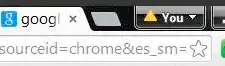
Yellow triangle next to profile name?
enter image description here

If you're seeing a yellow triangle next to your profile name, then it means there's an error in the Account Sync. Click into it and you can re-authenticate with your password so that Chrome is signed in with your Google account. (There's a few benefits of that) That will take care of the yellow triangle and get your Chrome back to a happy state.
Paul Irish
  • 1,125
  • 2
    This no longer works. Use the --disable-new-avatar-menu shortcut flag instead. That still works on Chrome 44 (July 2015) – degenerate Jul 22 '15 at 13:14
5

Unfortunately Google has completely deactivated the settings workaround since Chrome 45

More about it officially right here: https://productforums.google.com/forum/#!topic/chrome/ixjLlM-Bmgc

One workaround is to force install version 46 of Chrome and pass in the parameter or set the flag. It's hard to get your hands on an .exe installer that doesn't auto-redirect you to the latest chrome version.

Lupo
  • 223
1

On Chrome 44 and newer on Windows, I managed to do it using the /disable-new-avatar-menu flag.

One of the other answers suggests adding --disable-new-avatar-menu to a shortcut, but this didn't work for me on Windows 8.1 (on Linux it did). On Windows, the trick was to replace -- with \, so now my shortcut has Target: "C:\Program Files (x86)\Google\Chrome\Application\chrome.exe" /disable-new-avatar-menu

Andrei
  • 35
  • This works for me as well in 44 (probably temporarily) +1: "C:\Program Files (x86)\Google\Chrome\Application\chrome.exe" /disable-new-avatar-menu"(replace the 2 dashes (--) with a forward slash (/) – paul bica Aug 15 '15 at 14:15
-1

You can use the enable-new-profile-management flag to disable the multi-user mechanism altogether. Paste the this URL in the Omnibox chrome://flags/#enable-new-profile-management and switch the flag value to Disabled.