175

I would like to use TikZ in other settings than TeX and I'd especially like to use the drawings on websites where the text should be searchable and selectable. However, I'm unsure of the best way to convert my drawings to SVG.

How do I best take some TikZ code, render the drawing and turn the output into SVG?

yo'
  • 51,322
  • 3
    Use the standalone class. See Compile a LaTeX document into a PNG image that's as short as possible which should be easily adjustable for SVG graphics. – Martin Scharrer Apr 13 '12 at 11:27
  • You can write an answer with that? I'd like to give the credit for it. – Henrik Hansen Apr 13 '12 at 11:29
  • 3
    Alternatively, when loaded with the correct driver (put \def\pgfsysdriver{pgfsys-tex4ht.def} before loading tikz) then you can run htlatex on the file to produce SVGs directly. I prefer to run them through scour (a python script for cleaning up SVGs) before posting them on the web. It works well in my experience so long as there isn't too much text. – Andrew Stacey Apr 13 '12 at 11:41
  • It's not a great one for how it's organised (the "answer" is in the question) but see http://tex.stackexchange.com/q/15039/86 for more details. – Andrew Stacey Apr 13 '12 at 11:43
  • I will post an answer. However, I don't think you can search and select text inside SVG graphics in your browser. At least Firefox under Linux can't do it. – Martin Scharrer Apr 13 '12 at 11:51
  • From this question on SVG ouput it seems like dvisvgm can be used. – Henrik Hansen Apr 13 '12 at 13:00
  • How about upping the challenge; SVG with MathML inside? – Mikael Öhman Apr 13 '12 at 14:53
  • 5
    Welcome to TeX.SE. Great first question. – Peter Grill Sep 15 '12 at 01:03
  • Thanks, Peter. I've tried most of the suggestions in the two posts you refer to, without good results, except for the Metapost suggestion in the second post. I shall try this, although I have never used Metapost. – Santo D'Agostino Sep 15 '12 at 01:20
  • OK, this is strange. The second post you mentioned led me to search and find www.tlhiv.org/MetaPost/tools/mptosvg/ . On this site, it is explained that first MetaPost is converted to pdf, then to svg. So I just used the online converter at the site to convert my pdf file to svg. Although the online site claims to use the same pdf2svg program that I downloaded, for some reason the online converter produces beautiful results whereas my downloaded version gave poor results. This may be a solution for me, but it would still be nice to produce svg directly from tikz so I'll let the question stand. – Santo D'Agostino Sep 15 '12 at 02:00
  • I see that pdf2svg relies on Cairo and Poppler, which I also downloaded, but perhaps they are not working together correctly on my machine, and they may be working correctly at the online conversion site. I shall work on this. But a direct tikz to svg solution would still be nice. – Santo D'Agostino Sep 15 '12 at 02:05
  • It would be very nice, if you’d provide an example tikz code, so others could try something out. – Speravir Sep 15 '12 at 02:22
  • After a quick look into the produced SVG: Try to use a font, that you can also provide as webfont. – Speravir Sep 15 '12 at 03:20
  • @SantoD'Agostino: Have converted your example to a compilable MWE. – Peter Grill Sep 15 '12 at 04:07
  • Which pdf2svg tool did you use? There is a commercial tool (by PDFTron). There is also an opensource tool (current version: 0.2.1). – Paul Gaborit Sep 15 '12 at 09:49
  • @Andrew Stacey When I use the advice at the linked question (with the command htlatex), I get a blank svg file, and the html file contains only an error message:

    XML Parsing Error: mismatched tag. Expected: . Location: file:///C:/Documents%20and%20Settings/User/Desktop/SVGexamples/EX-1.svg Line Number 253, Column 22: x" class="sqrt" > ---------------------^

    The zzfile.ps file contains just a single square root of x symbol.

    – Santo D'Agostino Sep 16 '12 at 19:53
  • @Andrew Stacey On the other hand, when I use the mzlatex command I do get an svg file, and the graphs are correctly rendered, but there are no square root symbols, and the fonts are incorrect. – Santo D'Agostino Sep 16 '12 at 20:01

9 Answers9

161

You can use the standalone class to produce tight PDF files for one or multiple TikZ pictures. I originally wrote it to simplify the creation of the many pictures of my thesis. Since v1.0 it includes a convert option which can convert the produced PDF into a graphics file automatically (using external software, which requires the -shell-escape compiler option).

This is very similar to Compile a LaTeX document into a PNG image that's as short as possible, but SVG needs some extra care.

You can write your TikZ pictures the following way:

\documentclass[tikz,convert={outfile=\jobname.svg}]{standalone}
%\usetikzlibrary{...}% tikz package already loaded by 'tikz' option
\begin{document}
\begin{tikzpicture}% Example:
  \draw (0,0) -- (10,10); % ...
  \draw (10,0) -- (0,10); % ...
  \node at (5,5) {Lorem ipsum at domine standalonus};
\end{tikzpicture}
\end{document}

Then either you compile the file as usual with pdflatex or another latex and convert the PDF to a SVG manually or compile it with the -shell-escape option and let standalone convert it for you.

Manual conversion can be done with a number of tools. It is simpler under Linux, because these tools are easily available there, but should be possible under Windows as well. (The convert options isn't really tested under Windows, btw.) By default standalone uses Image Magick's convert, which can do PDF to SVG but will not always give you good results. The pdf2svg tool seems to be better suited, but isn't supported out-of-the-box by standalone yet. It can of course be used manually as shown in Exporting all equations from a document as individual svg files.


You can configure standalone to use pdf2svg directly by using the command key of the convert option. Unfortunately, there is a small bug in standalone preventing it. I just fixed that and will upload the new version today.

With this you can write:

\documentclass[crop,tikz,convert={outext=.svg,command=\unexpanded{pdf2svg \infile\space\outfile}},multi=false]{standalone}[2012/04/13]
%\usetikzlibrary{...}% tikz package already loaded by 'tikz' option
\makeatletter
\begin{document}
\begin{tikzpicture}
  \draw (0,0) -- (10,10); % ...
  \draw (10,0) -- (0,10); % ...
  \draw (5,0) -- (0,10); % ...
  \node at (5,5) {Lorem ipsum at domine standalonus};
\end{tikzpicture}
\end{document}

The \unexpanded is required because LaTeX expands class options. You can also add \noexpand before every macro instead.

If you need this more often you can also use a standalone.cfg file which enables this for all (local) standalone files. Simply create this file as follows in the same directory:

% Local standalone.cfg file
\input{standalone/standalone.cfg}% Load main standalone.cfg file
\standaloneconfig{convert={command={pdf2svg \infile\space\outfile}}}

I might add a special pdf2svg key in the next version as well, so you only need to write the following then:

\documentclass[crop,tikz,convert=pdf2svg]{standalone}[2012/04/13]
% ...
Martin Scharrer
  • 262,582
  • 2
    The new version v1.0b is now in CTAN. Mirrors might need up to 24 hours to sync. TeXLive should have it inside the next few days. – Martin Scharrer Apr 13 '12 at 13:01
  • Escaping some special characters in the command key seems to be too complicated. That is why I prefer to invoke the conversion outside the standalone. – kiss my armpit Mar 09 '13 at 21:33
  • 3
    I am sorry, but ImageMagick produces raster images only, see Avoid using ImageMagick for 'Vector Image' to 'Vector Image' conversions EG: converting between formats like: PDF, PS, SVG http://www.imagemagick.org/Usage/formats/#vector

    pdf2svg is the only way to go

    – escalator Feb 18 '15 at 07:35
  • @escalator: Thanks for the link. I actually didn't know that. Note that standalone uses ghostscript on Linux by default (ImageMagick by defauly only on Windows), which should be able to create true vector graphics. That is also the reason I didn't noted the issue with IM, I'm a Linux user ;-) – Martin Scharrer Feb 18 '15 at 20:48
  • 1
    I tried to compile your latex file with pdflatex -shell-escape filename.tex. It generated an svg image. But the size was horrible: 17 MB. pdf was 13 KB. So, this method of conversion seems useless. Or I did something wrong? – user4035 Sep 03 '15 at 12:38
  • @user4035: The PDF will keep the text as text but the SVG will contain the paths of each letters which blows up the file size. However, 17 MB seems quite big. You could try to use a different PDF-to-SVG tool. – Martin Scharrer Sep 06 '15 at 19:59
  • 5
    It is worth noting that the pdf2svg tool described in this answer isn't actively developed anymore and that it should be abandoned in favour of dvisvgm which is part of the popular TeX distros (MiKTeX and TeXLive). See Martin's and Koho's answers. dvisvgm not only produces SVG from DVI, as its name suggest, but also from PostScript and PDF. Also, it automatically crops graphical content to the exact bounding box and thus does not require the standalone document class. – AlexG May 13 '20 at 08:22
  • 1
    @MartinScharrer Is there still a chance the convert=pdf2svg option might be added in the future? SVG is really taking over the web these days, making this option all the more useful. – Janosh Aug 21 '20 at 06:37
  • Unfortunately, after some LaTeX kernel updates this raises a "(\end occurred when \ifx on line 5 was incomplete)" error message, which happens whenever a \stop is executed inside a package. – user202729 Jan 18 '23 at 03:46
  • @user202729: Yes, I am aware. But it should be a warning not an error and compilation should complete. – Martin Scharrer Feb 07 '23 at 07:48
22

You can use dvisvgm, which is a built-in tool of some TeX distributions (e.g. MiKTeX).

The basic usage:

latex testsvg.tex
dvisvgm testsvg.dvi

Then the SVG file will be saved in the current directory.

If you converted a simple math formula but get garbage when displaying the SVG, you can run dvisvgm with option --no-fonts to replace the fonts with path elements.

dvisvgm --no-fonts testsvg.dvi

As of version 2.0, you can call dvisvgm with option --font-format=woff, you should get SVG files that render correctly in almost all recent web browsers.

dvisvgm --font-format=woff testsvg.dvi

If you use TeXstudio, you can edit the texstudio.ini file (located in AppData\Roaming\TeXstudio for Windows) and add the following line below [texmaker].

Tools\Commands\dvi2svg="txs:///latex | dvisvgm --font-format=woff %.dvi"

Restart TeXstudio and you can find your custom command at Tools->User->dvi2svg.

gerhard
  • 321
  • 1
    The --font-format=woffis a great hint which is missing from the dvisvgm FAQ. It enabled me to get sensible output in Chrome, Firefox, IE and Edge, while keeping all text as text. – DaveP Apr 27 '18 at 01:38
  • 1
    This is also the top recommended tool at pgfmanual page 118 now: Unlike the tex4ht driver below, this driver has full support of text nodes. – Kaan E. Jan 17 '20 at 03:48
20

I use tex4ht and set the PGF output format to SVG. This solution comes from page 110 of the pgfmanual http://mirrors.ctan.org/graphics/pgf/base/doc/generic/pgf/pgfmanual.pdf.

I've only used it to create SVG of a TikZ picture in an otherwise empty \documentclass{article} but it looks like you could use this to make html with SVG graphics of a large document.

The advantage of this approach is that the SVG is produced by PGF and you know you're getting vector graphics. Also you get the result in a single step. It won't do functional shading or matricies and text in the pictures can be a problem but there's more on fixing that in the pgfmanual.

  • In the TeX or LaTeX document preamble before you load the TikZ package, e.g. with \usepackage{tikz} in LaTeX type:

    \def\pgfsysdriver{pgfsys-tex4ht.def}
    
  • Then process the TeX or LaTeX with httex or htlatex as appropriate. You may need to add tex4ht to your tex installation; it's at http://www.tug.org/applications/tex4ht/. For example to process my file called logoname.tex I do

    htlatex logoname.tex
    
  • The following output files are created in the current directory

    logoname.html 
    logoname.css
    logoname-1.svg
    

If you have more TikZ pictures in the document I assume they would become logoname-2.svg and so on.

I'm able to look at the SVG output in firefox and inkscape so it seems to produce good results.

jherbold
  • 301
18

On linux, you can use pdf2svg (an opensource tool). All glyphs are converted to paths, thus you can't edit your text. But it is the only tool that seems to give good results for images mixing drawings and texts.

In your MWE, to get smooth result, I add the smooth option to plot.

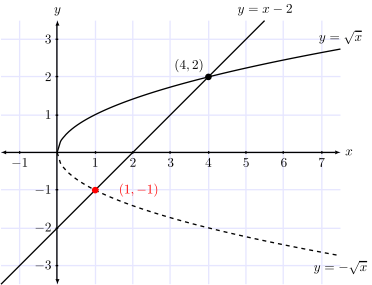
Here is a snapshot of the svg file rendered by Firefox (click on the image to download the SVG file):

enter image description here

Here the two commands used to convert TEX to SVG:

pdflatex file.tex
pdf2svg file.pdf file.svg

Your MWE with my changes:

\documentclass{standalone}
\usepackage{tikz}
\usepackage{lmodern}
\usepackage[T1]{fontenc}
\begin{document}
\begin{tikzpicture}[domain=-2:2,samples=100,scale=1.0,>=latex]
\tikzset{bgrid/.style={help lines,color=blue!10,very thin}}

\draw[bgrid] (-1.5,-3.5) grid (7.5,3.5);

\draw[<->, color=black] (-1.5,0) -- (7.5,0) node[right] {$x$};
\draw[<->, color=black] (0,-3.5) -- (0,3.5) node[above] {$y$};

\foreach \x/\xtext in {-1,1,2,3,4,5,6,7}
\draw (\x cm,1pt) -- (\x cm,-1pt) node[anchor=north] {$\xtext$};

\foreach \y/\ytext in {-3,-2,-1,1,2,3}
\draw (1pt,\y cm) -- (-1pt,\y cm) node[anchor=east] {$\ytext$};

\draw[thick,color=black,domain=0:7.5,smooth]
plot (\x,{sqrt(\x)}) node[anchor=south] {$y = \sqrt{x}$};
\draw[dashed,color=black,domain=0:7.5,smooth]
plot (\x,{(-1)*(sqrt(\x))}) node[anchor=north] {$y = -\sqrt{x}$};
\draw[thick,color=black,domain=-1.5:5.5,samples=3]
plot (\x,{(\x)-2}) node[anchor=south] {$y = x - 2$};

\filldraw[black] (4,2) circle(2pt) node[anchor=south east] {$(4, 2)$};
\filldraw[red] (1,-1) circle(2pt);
\draw[red] (1.5,-1) node[anchor=west] {$(1, -1)$};

\end{tikzpicture}
\end{document}
Paul Gaborit
  • 70,770
  • 10
  • 176
  • 283
  • I have tried to implement your suggestion, but this doesn't work for me in MiKTeX in Windows. I can produce a pdf file as usual, but when I use the command

    pdf2svg file.pdf file.svg

    I get the following error message:

    'pdf2svg' is not recognized as an internal or external command, operable program or batch file.

    Using the commands htlatex or mzlatex produce html files that do not have the graphics in them, and do not produce svg files.

    – Santo D'Agostino Sep 16 '12 at 19:29
  • 1
    @SantoD'Agostino: To my knowledge, opensource pdf2svg exists only for linux. – Paul Gaborit Sep 16 '12 at 21:27
  • Sorry to hear this, Paul, but thanks very much for your time anyway. I now face the question of whether I should transfer my latex operation from my Windows machine to my Linux machine; if I do this (which seems inevitable, the only question being when), then your answer will be relevant, and I will store it for use at that time.

    Thanks again!

    – Santo D'Agostino Sep 16 '12 at 22:51
  • 2
    @SantoD'Agostino here is a cross-compiled version, that works under windows for me. Just download, unzip and add the location to the Path system environment variable. – Carsten Aug 24 '18 at 10:42
10

If I run dvisvgm with option -n and the evaluation of PostScript specials is enabled, I get the expected result:

enter image description here

Since MiKTeX doesn't provide a dvisvgm binary through its repositories, you have to install it manually. Recent builds for MiKTeX are available from the dvisvgm website. Simply extract dvisvgm.exe to the MiKTeX subfolder miktex\bin, or even better, install it in a local texmf tree.

Martin
  • 2,628
  • This doesn't work for me in MiKTeX (Windows). I get a one-line mash up of symbols, and no graph.

    I placed the dvisvgm.exe in the miktex\bin folder (I'm using MiKTeX 2.8).

    How do I enable the evaluation of PostScript specials?

    – Santo D'Agostino Sep 16 '12 at 19:39
  • In order to enable the processing of PS specials, you have to install a recent version of Ghostscript, and add the directory containing gsdll32.dll to the PATH environment variable. You can check the availability of PS processing with dvisvgm -l. If the ps entry is present, everything should work as expected. – Martin Sep 17 '12 at 06:09
  • This works!

    Thank-you very much, Martin!

    All the best!

    – Santo D'Agostino Sep 17 '12 at 13:18
  • You're welcome. I'm glad to hear that you've got it working now. – Martin Sep 17 '12 at 13:34
  • Hi Martin, I think I spoke a little too soon. The program works if I use the example file, but if I try to use standalone with the following first line

    \documentclass[tikz,crop=true,border=0.5cm]{standalone}

    then I get an error message

    DVI error: no font selected

    and no svg file is produced. Any advice? (Using dvisvgm -l shows that the ps entry is present, so that is not the problem.)
    – Santo D'Agostino Sep 17 '12 at 19:14
  • Hi Martin, Thanks for the fix. However, I tried it and the result was an upside-down graph (not serious as it can be flipped, but I thought you would want the feedback), and some symbols are not rendered properly (negative signs and square root symbols). I switched to MiKTeX 2.9 with the same result. I don't know if it is still a bug in dvisvgm or if I am missing some font files. However, the original MWE run with the new .exe file suffers the same font problems as the current standalone example, although the original MWE is rendered right-side-up in the svg output. – Santo D'Agostino Sep 18 '12 at 00:59
  • Thanks, Martin. I've sent you an email message so that you will have my email address. – Santo D'Agostino Sep 18 '12 at 15:23
  • I'm not getting the ps entry although I added the path. My gs version is 9.09. – remus Oct 09 '13 at 11:45
  • Fixed. svg created but it's upside down and mirrored. And some characters look strange - like they are missing edges. – remus Oct 09 '13 at 11:56
  • dvisvgm is indeed neat. I built a script a while ago that uses it to create SVGs from standalone TikZ. – Raphael May 20 '16 at 14:08
5

You might want to check out a tool I just wrote: tikz2svg.

Given in.tikz (or stdin):

> cat in.tikz
\begin{tikzpicture}
  \fill[red!90!black]   ( 90:.6) circle (1);
  \fill[green!80!black] (210:.6) circle (1);
  \fill[blue!90!black] (330:.6) circle (1);
\end{tikzpicture}

It outputs:

> cat tikz2svg < in.tikz
<?xml version="1.0" encoding="UTF-8"?>
<svg xmlns="http://www.w3.org/2000/svg" xmlns:xlink="http://www.w3.org/1999/xlink" width="93.472pt" height="86.205pt" viewBox="0 0 93.472 86.205" version="1.1">
<g id="surface1">
<path style=" stroke:none;fill-rule:nonzero;fill:rgb(89.99939%,0%,0%);fill-opacity:1;" d="M 76.742188 30.347656 C 76.742188 14.691406 64.050781 2 48.394531 2 C 32.742188 2 20.050781 14.691406 20.050781 30.347656 C 20.050781 46.003906 32.742188 58.695312 48.394531 58.695312 C 64.050781 58.695312 76.742188 46.003906 76.742188 30.347656 Z "/>
<path style=" stroke:none;fill-rule:nonzero;fill:rgb(0%,79.998779%,0%);fill-opacity:1;" d="M 62.011719 55.859375 C 62.011719 40.203125 49.324219 27.511719 33.667969 27.511719 C 18.011719 27.511719 5.320312 40.203125 5.320312 55.859375 C 5.320312 71.515625 18.011719 84.207031 33.667969 84.207031 C 49.324219 84.207031 62.011719 71.515625 62.011719 55.859375 Z "/>
<path style=" stroke:none;fill-rule:nonzero;fill:rgb(0%,0%,89.99939%);fill-opacity:1;" d="M 91.472656 55.859375 C 91.472656 40.203125 78.78125 27.511719 63.125 27.511719 C 47.46875 27.511719 34.777344 40.203125 34.777344 55.859375 C 34.777344 71.515625 47.46875 84.207031 63.125 84.207031 C 78.78125 84.207031 91.472656 71.515625 91.472656 55.859375 Z "/>
</g>
</svg>

See https://juan.benet.ai/blog/2014-03-09-tikz2svg/

Carsten
  • 299
5

I've written a command line utility that automates the process described in the accepted answer.

It's called tikztosvg and it is distributed under the GPL-3 license at it's official GitHub repository. Let's say you want to convert the file example.tikz to SVG:

\begin{tikzcd}
    G \arrow[r, "\varphi"] \arrow[d, "\psi"', two heads] & H \\
    \sfrac{G}{\ker \varphi} \arrow[ru, dotted]           &
\end{tikzcd}

You could achieve that by running the following command:

$ tikztosvg -p tikz-cd -p xfrac example.tikz

The results will be stored in the file example.svg:

example

I'd love to have some feedback on it. Issues and PRs are very much welcomed!

Sebastiano
  • 54,118
  • 2
    Welcome to TeX.SE. – CampanIgnis May 08 '20 at 22:55
  • It would be appreciated if you could just provide a simple example, perhaps from the manual to improve the now link-only answer. You should consider to make your solution compatible TeX Live and post it on https://ctan.org. You will reach more users. – CampanIgnis May 08 '20 at 22:58
  • @CampanIgnis It's already compatible with TeX Live! It uses xelatex for rendering. I'm not familiarized with Ctan, but I'll look into it. – Gark Garcia May 08 '20 at 23:26
  • 1
    @CampanIgnis I've edited my answer to include the example described in the manual page. – Gark Garcia May 08 '20 at 23:31
  • 1
    Sorry for being unclear. I meant it would be great if it could be shipped with future TeX Live versions or downloadable form ctan while working OOTB. – CampanIgnis May 09 '20 at 14:52
  • 1
    @CampanIgnis Sure. I've rewritten it in bash (instead of fish) to make it more accessible. Now the only dependencies are bash, xelatex and pdf2svg. I'll publish it in Ctan as soon as I can. – Gark Garcia May 12 '20 at 23:33
  • 1
    The package arrived on ctan: https://ctan.org/pkg/tikztosvg. – CampanIgnis May 15 '20 at 23:00
4

I find it very easy to use InkScape instead of ImageMagick.

Step 1: Use the standalone class and compile the .pdf version of your TikZ picture. You don't have to put in any other class options like 'convert' and the like.
(example:\documentclass[tikz]{standalone}).

Step 2: Open the compiled pdf with InkScape instead of ImageMagick. File > Open > compiled.pdf. This will open the pdf as an SVG. You can then save it in an SVG format or export it to any other format such as png, jpeg, etc.

Also, when you open the file in InkScape, you can edit the individual components of your image. I find this very flexible to use.

1

In LuaLaTeX, there's an alternative to the accepted answer that is faster (in compilation time).

%! TEX program = lualatex

% instead of doing this... %\documentclass[tikz, convert={outext=.svg,pdf2svg}]{standalone}

% you do the following... \documentclass[tikz]{standalone} \directlua{luatexbase.add_to_callback("wrapup_run", function() os.execute("pdf2svg \jobname.pdf \jobname.svg") print("Converted to SVG.") end, "final callback to convert pdf file")}

\begin{document} \begin{tikzpicture} \draw (0,0) -- (1,1); \end{tikzpicture} \end{document}

The output is the same.

I explained what the standalone package does by default at https://tex.stackexchange.com/a/671818/250119. You can see it's more efficient because it needs to spawn another lualatex process, while this method only requires spawning pdf2svg.

On my machine, this method is faster by roughly 0.8 seconds.


Benchmark of different methods to convert PDF to SVG

Command Text format Slowdown
pdf2svg b.pdf b.svg (1) Path 1.00
mutool convert -o b.svg b.pdf && mv b1.svg b.svg Path 1.01 ± 0.10
pdftocairo -svg b.pdf b.svg Path 1.03 ± 0.07
dvisvgm --no-specials=ps b.dvi b.svg Path 3.04 ± 0.45
dvisvgm --no-fonts b.dvi b.svg Path 5.74 ± 0.37
dvisvgm b.dvi b.svg Text 5.79 ± 0.33
dvisvgm --font-format=woff b.dvi b.svg Text 5.81 ± 0.37
pdf2ps -dNoOutputFonts b.pdf b.ps && pstoedit -f plot-svg b.ps b.svg (2) Path (buggy) 8.74 ± 0.49
dvisvgm --pdf b.pdf b.svg Text 9.98 ± 0.59
pdf2ps b.pdf b.ps && pstoedit -f plot-svg b.ps b.svg Text 11.00 ± 0.59
pdf2ps b.pdf b.ps && pstoedit -f fig b.ps b.fig && fig2dev -L svg b.fig b.svg (1, 2) Text 11.05 ± 0.61
inkscape --export-type=svg b.pdf Path 19.15 ± 1.06

Benchmark was done with hyperfine.

In summary: pdf2svg is the fastest, inkscape is the slowest.

Note that in order to preserve hyperlinks, in the original TeX source code, you need \usepackage[hypertex]{hyperref}.

None of the methods support preserving hyperlinks. Hyperlinks are not included in the SVG file. Refer to https://stackoverflow.com/questions/60750771/inkscape-pdf-to-svg-export-retain-hyperlinks

(1): Note that pdf2svg is unmaintained now, http://cityinthesky.co.uk/opensource/pdf2svg/ recommends using pdftocairo instead which is only 3% slower.

(2): Note that pstoedit is rather buggy when there is a character with a hole, and the input file has text converted to path --- the hole is filled instead of zeroed out.

Other methods

user202729
  • 7,143
  • Same question on Apple.SE: https://apple.stackexchange.com/questions/66354/is-there-a-free-command-line-program-for-converting-pdf-files-to-svg – user202729 Feb 04 '24 at 00:09