I'm currently reading the TeXbook, and I use \show a lot to see how Knuth defined plain-TeX macros in terms of TeX primitives. For instance, to have access to the definition of \centerline, I would write \show\centerline in my input file. When I compile that file with pdftex in interactive mode from the command line (a Unix terminal, in my case), TeX generates an error message that shows me the definition of \centerline in the terminal and offers me a menu of options (as described in Chapter 6: Running TeX in the TeXbook).
I understand that design choice by Knuth of having TeX generate an error message for each instance of \show: he probably wanted to leave the user some time to read what \show... prints in the terminal before letting TeX resume execution, instead of having to open the log file only after the end of the compilation.
However, instances of \show... in the input file have the undesirable side-effect of raising "errors" (false alarms, really) when pdftex is called from within an IDE such as TeXmaker with option -interaction=nonstopmode. For example,
\show\centerline
\bye
when compiled with pdftex -interaction=nonstopmode causes TeXmaker to report
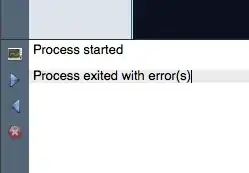
Obviously, those false alarms prove really annoying when debugging. I always have to ask myself: Wait... are those errors due to instances of \show in my input file, or are they bona fide errors? On the other hand, my understanding is that you have to specify
-interaction=nonstopmode
if you want to call pdftex from within an IDE. Therefore, my question is:
Is there any way of preventing TeXmaker from reporting those "false alarms"?
Note: the problem I describe may be present in IDEs other than TeXmaker as well.


\showuses the same routine as error messages. Use it only in interactive sessions. – egreg Nov 06 '13 at 17:51\showare indistinguishable from bona fide errors. I wish I could use\showinnonstopmodewithout having to deal with that problem. Oh well! I guess I can just use\meaning... – jub0bs Nov 06 '13 at 17:56\texttt{\meaning\foo}prints (almost) the same information. But for looking at meanings I prefer running interactively, so I can add other commands to look at. Alsotexdefis good for this. However, error lines start with!, while\showlines start with>; if Texmaker doesn't distinguish between the two cases it's its fault. – egreg Nov 06 '13 at 18:03\typeout{\meaning<cs>}. – Werner Nov 06 '13 at 18:03texdefandlatexdefare very handy in a command line console. Ah, sorry already inegreg's comment! Besides withemacs/auctexthere is no problem; only\showboxis truly a pain there. – Nov 06 '13 at 18:22tex, notlatex, I guess you meant{\tt \meaning\foo}, though. – jub0bs Nov 06 '13 at 18:47tex. Isn'ttypeouta LaTeX macro? – jub0bs Nov 06 '13 at 18:49\def\typeout{\immediate\write17}according tolatex.ltxwhich you can define similarly I guess. – Werner Nov 06 '13 at 18:52texdefandlatexdef. I didn't even know of their existence. Very useful indeed. – jub0bs Nov 06 '13 at 19:27typeoutsolution addresses both): expl3 - How can I make TeX stop on the first error, but do not stop on \show (or \tl_show:n)? - TeX - LaTeX Stack Exchange – user202729 Dec 10 '21 at 10:57