0

I was working on a project and I don't know how but the viewport started hiding things out of a camera range... I tried deleting the camera but it did not work.. here is how it looks like: ex the archive: https://1drv.ms/u/s!ApEztyCWw8odqnpUJSYRx8dbr_ni
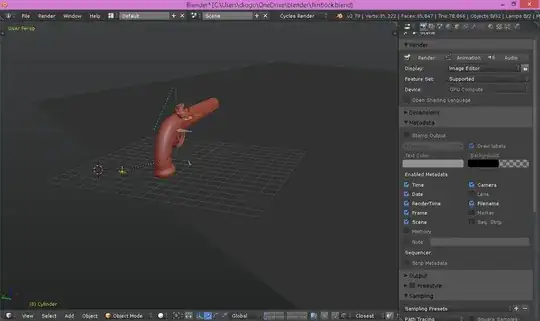
EDIT: So, I think this is probably a glitch. I tried to open it with blender 2.8 and the problem just disappeared.. I cannot save it in 2.8 tho because I Still want to use it in 2.79b.

Diogo Valadares
  • 316
  • 1
  • 17
  • https://blender.stackexchange.com/questions/121764/help-most-of-my-project-doesnt-show-but-still-renders and https://blender.stackexchange.com/questions/53923/i-can-only-see-model-via-a-transparent-grey-strip – Duarte Farrajota Ramos Dec 09 '18 at 19:38

2 Answers2

2

You have the Clipping Border active Alt + B , hit the same shortcut to clear it. You can also find the command in the View menu in the 3D viewport header.

Samir Rahamtalla
  • 1,131
  • 1
  • 11
  • 23
0

It could be a clipping problem.

Properties panel (N) > View section > check your clipping settings.

If it's happening while in Camera View:

Select your camera and then enable Display > Limits.

You may need to increase the End clipping distance in Properties > Camera settings > Lens.

Jason
  • 1
  • 1
  • the problem is not with the camera, as I mentioned I tried deleting it and the problem persists. There is this grey part that looks like a retangular spotlight and only what is inside it is being rendered in the OpenGL mode – Diogo Valadares Dec 09 '18 at 16:34