Does your sphere/disk have UVs?
Also, if you have UVs and move them by x-0.5, y-0.5, the gradient gets pushed outside of the UV space. If it's there it might be very faint.
An easy setup to control this can be the following:
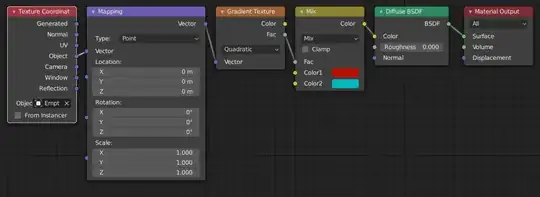
Note the Empty in the Texture Coordinate Node! - You can move, rotate and scale it to position the gradient. Keep it in the center of your object as a starting point. (My mapping node looks different because I'm using a build of 2.81 at the moment. But it works the same way.)
Another tip: Use the NodeWrangler Addon that comes bundled with Blender to look at the Outputs of the Texture Coordinates or the Mapping Node while you make changes. (Just Ctrl + Click the Node a few times) That way you can see what you're affecting.


