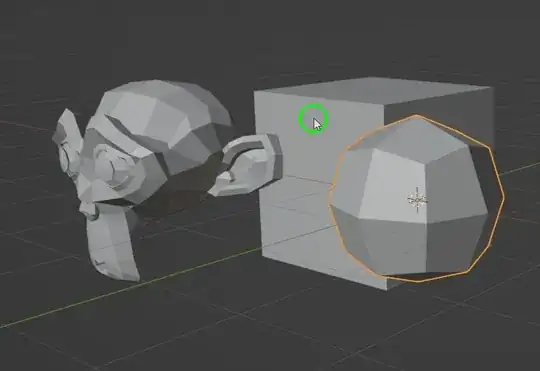
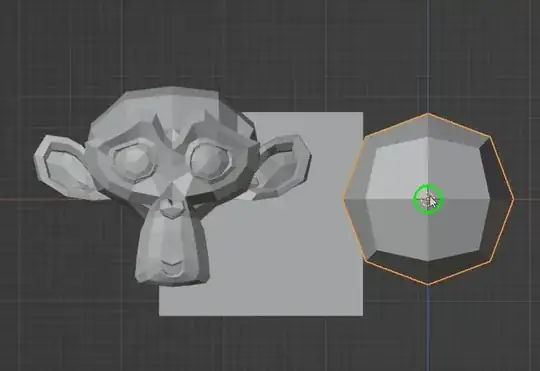
A solution based on the operator modal draw example (template).
Perspective:
Ortho:
The script is in two parts.
First try to hit an object in the scene and if no success try to hit the 3d view grid.
- Hitting an object in the scene:
Based on scene.ray_cast, which gives hit object, location and face index.
Though, we won't hit if the mouse cursor is near but outside of the objet. As workaround, a possibility is to try to hit along a circle which is around the mouse cursor position (and keep the closest result).
The grid is visible as X/Y plane except if we are on side view.
We can use intersect_line_plane from mathutils.geometry to get the intersection of the view direction with this plane.
The grid scale is given by the region3D.view_distance.
If we take log10(region3D.view_distance) - 1, the grid scale is 10 ** this value (the equivalent to mm, cm, 10cm, m, 10m, etc. indication on the 3d view).
In both cases we end with a polygon. Either an object face or a square on the grid plane.
We just have to snap on it if a Ctrl key is pressed.
Snapping is in two parts. Snap to vertices and snap to edges.
We get each vertex of the polygon, project it back to the view and compare its distance to the mouse cursor. If less than a radius value, we snap.
We have to get the position on the edge that appears to be the closest to the mouse position, when it is projected on the view.
For simplicity (avoiding geometry calculation that are too complex for me), I did it iteratively, with a dichotomy (loop until the result is acceptable under an epsilon value).
Full code.
import bpy
import blf
import gpu
from gpu_extras.batch import batch_for_shader
from mathutils import Vector
from mathutils.geometry import intersect_line_plane
from math import pi, cos, sin, floor, ceil, log10
from bpy_extras import view3d_utils
from gpu_extras.presets import draw_circle_2d
RADIUS = 20
STEPS = 12
def draw_callback_px(self, context):
if self is None: print("self is None")
color = (0, 1, 0, 1)
if self.hit_grid: color = (0, 0, 1, 1)
if self.hit_object or self.hit_grid:
region = context.region
region3D = context.space_data.region_3d
circle_loc = view3d_utils.location_3d_to_region_2d(region, region3D, self.hit_location)
if circle_loc is not None:
gpu.state.line_width_set(4.0)
draw_circle_2d(circle_loc, color, RADIUS)
#ray_cast adding the view point in the result
def ray_cast(context, depsgraph, position):
region = context.region
region3D = context.space_data.region_3d
#The view point of the user
view_point = view3d_utils.region_2d_to_origin_3d(region, region3D, position)
#The direction indicated by the mouse position from the current view
view_vector = view3d_utils.region_2d_to_vector_3d(region, region3D, position)
return *context.scene.ray_cast(depsgraph, view_point, view_vector), view_point
#try to find the best hit point on the scene
def best_hit(context, depsgraph, mouse_pos):
#at first we raycast from the mouse position as it is
result, location, normal, index, object, matrix, view_point = \
ray_cast(context, depsgraph, mouse_pos)
if result:
return result, location, index, object, view_point
#but if we are near but outside the object surface, we need to inspect around the
#mouse position and keep the closest location
best_result = False
best_location = best_index = best_object = None
best_distance = 0
angle = 0
delta_angle = 2 * pi / STEPS
for i in range(STEPS):
pos = mouse_pos + RADIUS * Vector((cos(angle), sin(angle)))
result, location, normal, index, object, matrix, view_point = \
ray_cast(context, depsgraph, pos)
if result and (best_object is None or (view_point - location).length < best_distance):
best_ditance = (view_point - location).length
best_result = True
best_location = location
best_index = index
best_object = object
angle += delta_angle
return best_result, best_location, best_index, best_object, view_point
def search_edge_pos(region, region3D, mouse, v1, v2, epsilon = 0.0001):
#dichotomic search for the nearest point along an edge, compare to the mouse position
#not optimized, but easy to write... ;)
while (v1 - v2).length > epsilon:
v12D = view3d_utils.location_3d_to_region_2d(region, region3D, v1)
v22D = view3d_utils.location_3d_to_region_2d(region, region3D, v2)
if v12D is None: return v2
if v22D is None: return v1
if (v12D - mouse).length < (v22D - mouse).length:
v2 = (v1 + v2) / 2
else:
v1 = (v1 + v2) / 2
return v1
def snap_to_geometry(self, context, vertices):
region = context.region
region3D = context.space_data.region_3d
#first snap to vertices
#loop over vertices and keep the one which is closer once projected on screen
snap_location = None
best_distance = 0
for co in vertices:
co2D = view3d_utils.location_3d_to_region_2d(region, region3D, co)
if co2D is not None:
distance = (co2D - self.mouse_pos).length
if distance < RADIUS and (snap_location is None or distance < best_distance):
snap_location = co
best_distance = distance
if snap_location is not None:
self.hit_location = snap_location
return
#then, if no vertex is found, try to snap to edges
for co1, co2 in zip(vertices[1:]+vertices[:1], vertices):
v = search_edge_pos(region, region3D, self.mouse_pos, co1, co2)
v2D = view3d_utils.location_3d_to_region_2d(region, region3D, v)
if v2D is not None:
distance = (v2D - self.mouse_pos).length
if distance < RADIUS and (snap_location is None or distance < best_distance):
snap_location = v
best_distance = distance
if snap_location is not None:
self.hit_location = snap_location
return
def snap_to_object(self, context, depsgraph):
#the object need to be evaluated (if modifiers, for instance)
evaluated = self.hit_object.evaluated_get(depsgraph)
data = evaluated.data
polygon = data.polygons[self.hit_face_index]
matrix = evaluated.matrix_world
#get evaluated vertices of the wanted polygon, in world coordinates
vertices = [matrix @ data.vertices[i].co for i in polygon.vertices]
snap_to_geometry(self, context, vertices)
def floor_fit(v, scale):
return floor(v / scale) * scale
def ceil_fit(v, scale):
return ceil(v / scale) * scale
def snap_to_grid(self, context, crtl_is_pressed):
region = context.region
region3D = context.space_data.region_3d
view_point = view3d_utils.region_2d_to_origin_3d(region, region3D, self.mouse_pos)
view_vector = view3d_utils.region_2d_to_vector_3d(region, region3D, self.mouse_pos)
if region3D.is_orthographic_side_view:
#ortho side view special case
norm = view_vector
else:
#other views
norm = Vector((0,0,1))
#At which scale the grid is
# (log10 is 1 for meters => 10 ** (1 - 1) = 1
# (log10 is 0 for 10 centimeters => 10 ** (0 - 1) = 0.1
scale = 10 ** (round(log10(region3D.view_distance)) - 1)
#... to be improved with grid scale, subdivisions, etc.
#here no ray cast, but intersection between the view line and the grid plane
max_float =1.0e+38
co = intersect_line_plane(view_point, view_point + max_float * view_vector, (0,0,0), norm)
if co is not None:
self.hit_grid = True
if crtl_is_pressed:
#depending on the view angle, create the list of vertices for a plane around the hit point
#which size is adapted to the view scale (view distance)
if abs(norm.x) > 0:
vertices = [Vector((0, floor_fit(co.y, scale), floor_fit(co.z, scale))), Vector((0, floor_fit(co.y, scale), ceil_fit(co.z, scale))), Vector((0, ceil_fit(co.y, scale), ceil_fit(co.z, scale))), Vector((0, ceil_fit(co.y, scale), floor_fit(co.z, scale)))]
elif abs(norm.y) > 0:
vertices = [Vector((floor_fit(co.x, scale), 0, floor_fit(co.z, scale))), Vector((floor_fit(co.x, scale), 0, ceil_fit(co.z, scale))), Vector((ceil_fit(co.x, scale), 0, ceil_fit(co.z, scale))), Vector((ceil_fit(co.x, scale), 0, floor_fit(co.z, scale)))]
else:
vertices = [Vector((floor_fit(co.x, scale), floor_fit(co.y, scale), 0)), Vector((floor_fit(co.x, scale), ceil_fit(co.y, scale), 0)), Vector((ceil_fit(co.x, scale), ceil_fit(co.y, scale), 0)), Vector((ceil_fit(co.x, scale), floor_fit(co.y, scale), 0))]
#and snap on this plane
snap_to_geometry(self, context, vertices)
#if no snap or out of snapping, keep the co
if self.hit_location is None:
self.hit_location = Vector(co)
def main(self, crtl_is_pressed, context):
self.hit_location = None
self.hit_grid = False
depsgraph = context.evaluated_depsgraph_get()
result, location, index, object, view_point = \
best_hit(context, depsgraph, self.mouse_pos)
self.hit_location = location
self.hit_face_index = index
self.hit_object = object
self.view_point = view_point
if result and crtl_is_pressed:
snap_to_object(self, context, depsgraph)
elif not result:
snap_to_grid(self, context, crtl_is_pressed)
class ModalDrawOperator(bpy.types.Operator):
"""Draw a line with the mouse"""
bl_idname = "view3d.modal_draw_operator"
bl_label = "Simple Modal View3D Operator"
def modal(self, context, event):
context.area.tag_redraw()
if event.type == 'MOUSEMOVE' or event.type in {"LEFT_CTRL", "RIGHT_CTRL"}:
self.mouse_pos = Vector((event.mouse_region_x, event.mouse_region_y))
main(self, event.ctrl, context)
elif event.type == 'LEFTMOUSE':
bpy.types.SpaceView3D.draw_handler_remove(self._handle, 'WINDOW')
return {'FINISHED'}
elif event.type in {'RIGHTMOUSE', 'ESC'}:
bpy.types.SpaceView3D.draw_handler_remove(self._handle, 'WINDOW')
return {'CANCELLED'}
return {'PASS_THROUGH'}
def invoke(self, context, event):
if context.area.type == 'VIEW_3D':
self.mouse_pos = Vector()
self.hit_object = None
# the arguments we pass the the callback
args = (self, context)
# Add the region OpenGL drawing callback
# draw in view space with 'POST_VIEW' and 'PRE_VIEW'
self._handle = bpy.types.SpaceView3D.draw_handler_add(draw_callback_px, args, 'WINDOW', 'POST_PIXEL')
context.window_manager.modal_handler_add(self)
return {'RUNNING_MODAL'}
else:
self.report({'WARNING'}, "View3D not found, cannot run operator")
return {'CANCELLED'}
def menu_func(self, context):
self.layout.operator(ModalDrawOperator.bl_idname, text="Modal Draw Operator")
Register and add to the "view" menu (required to also use F3 search "Modal Draw Operator" for quick access).
def register():
bpy.utils.register_class(ModalDrawOperator)
bpy.types.VIEW3D_MT_view.append(menu_func)
def unregister():
bpy.utils.unregister_class(ModalDrawOperator)
bpy.types.VIEW3D_MT_view.remove(menu_func)
if name == "main":
register()
To run the script, search for Simple Modal View3D Operator (and use Ctrl to snap).