7

I have a question related to implicit equation in Blender.

I made a project developing about 100 parametric equitation/ or algebraic minimal surfaces, first with xyz math function, later I translated most of them to Geometry Nodes.(example in the Attachment & screenshot).

Now I would like to make the next step and build a collection of the implicit equations like:

$ x^2+y^2+z^2+sin(4x)+sin(4y)+sin(4z)-1 = 0 $

But I don’t find a way, neither any kind of addon, nor a helpful article in this forum or in the www.

So, maybe one of you have an idea how to import implicit equations to blender? I am happy about all hints and inspiring idea’s ✌️
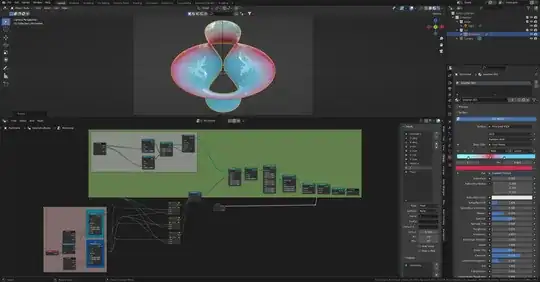

scene

taiyo
  • 3,384
  • 1
  • 3
  • 18
smice
  • 185
  • 8
  • 1
    What does "implicit" mean in "implicit equations" exactly? For easy conversions, see How do i convert this equation into the node editor? – Markus von Broady Sep 10 '23 at 20:32
  • 1
    There are addons for creating nodes from equations https://blendermarket.com/products/node-expressions?ref=165 – taiyo Sep 10 '23 at 20:52
  • 1
    Hi Markus, “ An implicit equation is an equation which relates the variables involved”, so y= … or z=… it includes the relation. Like you see in the example 0= …. – smice Sep 10 '23 at 21:38
  • Hi Tayio, the problem is not the translation of equitations to proper Nodes, I made this many times. My question is how to integrate „implicit equation“ properly into Geometry Nodes? – smice Sep 10 '23 at 21:45
  • As you say, it's a relation. So you take all but one variable as an input, and read the output as the remaining value. For example for $y = 2x$ (or $y - 2x = 0$) create a mesh line going from $x=0$ to $x=10$ for example, and then use the Set Position node to set the points' $y$ coordinate based on existing $x$ coordinate. – Markus von Broady Sep 10 '23 at 23:03
  • As far as I know, GN does not support implicit functions. You have to do it via python by plotting a series of points using specialized libraries like matplotlib.pyplot https://stackoverflow.com/questions/2484527/is-it-possible-to-plot-implicit-equations – Harry McKenzie Sep 11 '23 at 04:16
  • @MarkusvonBroady implicit means an equation where you cannot separate the variables like y^2 + xy = 0, there is no way to define one variable in terms of the other, that is explicitly isolating one variable. So you need some other numerical methods to accomplish this and GN cannot do it. – Harry McKenzie Sep 11 '23 at 04:44
  • @Markusvonbroady nevertheless, thanks for your idea – smice Sep 11 '23 at 05:02
  • @harrymckenzie thanks for your answer. Of course I was reading the post before, but I am bad in Python, and I have about 50-60 equation which I want to realize, so I thought that somebody maybe found another solution or a „helper-script “ to make it more easier – smice Sep 11 '23 at 05:08
  • @smice so Markus has proven me wrong! there indeed is a way with Volume Cube node! – Harry McKenzie Sep 11 '23 at 09:02

1 Answers1

6

Here's one way to display:

$$ x^2+y^2+z^2+sin(4x)+sin(4y)+sin(4z)-1 = 0 $$

For a better visual Effect, with a strong PC you can Smooth (modifier) it out decently:

You can add a material connecting Texture Coordinate: Generated to Base Color:

Markus von Broady
  • 36,563
  • 3
  • 30
  • 99
  • 1
    +1 that's an interesting approach! i didn't know you could plot implicit functions! i double checked and this is correct. https://snipboard.io/vROzVm.jpg. In the other 3d equation stuff we used Grid and set position. – Harry McKenzie Sep 11 '23 at 08:50
  • 1
    @HarryMcKenzie thanks for checking, because I didn't, and with those Vector Maths optimizations I was worried I could maybe get it wrong – Markus von Broady Sep 11 '23 at 08:57
  • this volume cube node is so cool. like holy cow.. finally we can plot any type of equation! really exciting! can i add another +1 vote??? on a side note though, this seems like a workaround? is the topology it generates clean? because you mentioned we need strong pc specs to smooth it out? sorry i didn't try it. – Harry McKenzie Sep 11 '23 at 09:09
  • 1
    @HarryMcKenzie the topology isn't any good, it's remesh. In general plotting is just sampling in a grid, though it can be postprocessed and smoothed out in various ways… – Markus von Broady Sep 11 '23 at 09:25
  • Hi @MarkusvonBroady, that i really interesting!! A big thanks for this. I will tryout later how far I come with this. Many thanks for your help …( I tried it with „points to volume“ and volume to mesh, but it was not nice.) – smice Sep 11 '23 at 13:00
  • Hi again @MarkusvonBroady. Two question (if i may ) In the original Equitation it seems to be like the "negative" version of your result? Screenhot 1 Could this be? And the second one is related to screenshot 2 - i guess we are using a different Blender Version - the result in case i try to reproduce it, looks different Screenhot 2 - Did it miss something ? (my ver. 3.6.0) – smice Sep 11 '23 at 13:51
  • @smice This is because I rendered only in range $[-1, 1]$ on each axis, therefore the shell is cut and you can see the inside. You have an error here: https://i.imgur.com/pjBVfgP.png – Markus von Broady Sep 11 '23 at 15:23
  • 2
    @MarkusvonBroady - sorry for my fault - works perfect your way ! i love it - thx so much ! ! – smice Sep 11 '23 at 17:47