The task
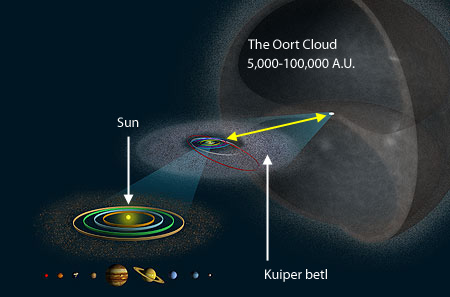
Ok, so, the title of this question is relatively abstract, but what I would actually like to do is pretty specific. Yesterday, I asked in a post over at graphic design, how I could recreate the following illustration in Inkscape, in particular the "particle cloud" that represents the cometary nuclei:

I already got some excellent solutions, but now I've tasted blood and would like to do a "proper" simulation of the cloud in 3D. At this point, I'd like to say that I'm completely new to blender. I literally installed it today, but I tried my best. Here is what I've done so far.
My approach
My basic idea was to hollow out a sphere to make the rough shape, and then somehow fill that shape with a point cloud (but maybe this is already the wrong approach). To hollow out the sphere, I thought I could use the Boolean Difference modifier between a solid sphere and a void object (e.g. as described in this video, to end up with something as described here). Because the void is radially symmetric, I thought maybe I could create it from a 2D mesh that traces the edge of the void and is then spun around 360°, similar to one of those folding lampions that you can buy.
So first, I imported a similar illustration into Blender that would allow me to more easily trace the shape of the void (other references can e.g. also be found here or here). Next, I added two Circle meshes, and scaled them to roughly fit the outer and inner edges of the cloud shape. Then I tabbed into Edit Mode, deleted all the vertices of the left half of the inner circle, and manually repositioned the lower group of the remaining vertices to roughly retrace the lower edge of the upper void:

Then I used the Spin tool to spin the 2D mesh around 360° to create the 3D shape of the upper void. Next, I duplicated the shape, mirrored it on the z axis, and joined the two shapes. At this point however, I already run into a problem : there is a small gap in the center where the two shapes meet, and I have no idea how I can close it.

In any case, next, I selected the outer 2D circle mesh, again removed the left half of the vertices, and this time spun the remaining ones 235° using the Spin tool to create the outer edge of the particle cloud shape. Now I tried to make it solid via the Solidify modifier, inspired by this post. However, I don't understand how I can make the entire sphere solid without creating some kind of artifacts, so this is basically where I am stuck right now. If I anyway go through with my plan and apply the solidify modifier to the sphere and then add a Boolean Difference modifier, nothing happens. How can I make this work?

Particle simulation
And of course, I'm still missing the major step of filling the shape with a particle cloud once the shape is created. Unfortunately, in this regard I didn't manage to find any relevant tutorials or similar, since the term "particle cloud" seems to have a very specific meaning in 3D modeling (like smoke and such), which, as far as I can tell, is not what I am looking for. So how would I do this, if that is even the right thing to do?