6

How can I set a camera projection matrix? I want to render a perspective like the old SimCity 1989:
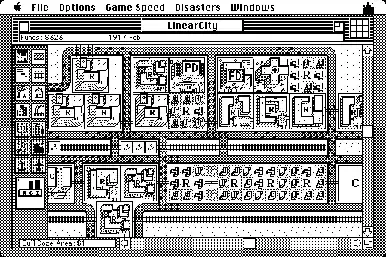
image description

Daniel
  • 3,624
  • 4
  • 31
  • 59
Châu
  • 201
  • 1
  • 9
  • Related: http://blender.stackexchange.com/questions/5183/how-to-make-a-two-point-perspective-render?, and http://blender.stackexchange.com/questions/1888/how-can-i-get-a-cabinet-projection-camera?rq=1 – gandalf3 Feb 06 '14 at 17:13
  • Great! Thanks very much! Please tell me how yu find the angles (curious how find them). – Châu Feb 08 '14 at 08:02
  • For my answer below I just eyeballed it based on the image you linked to. – gandalf3 Feb 08 '14 at 08:08
  • This not correct, is close but not correct. x and y direction lines not 90°. In blender picture look close, x grid lines almost horizontal but not horizontal, y lines OK. – Châu Feb 11 '14 at 09:05
  • I think I need matrix like this or transpose (assume no translation, no scale, no rotation): {x_c, y_c, z_c, w_c} = {x_w, y_w, z_w_, w_w} × {{1, 0, 0, 0}, {0, 1, 0, 0}, {ส, ส, 1 0 }, {0 0 1, 0}, {0 0 0 1}} Subscript w is world coordinate, c is camera, ส is scale for project z direction to x and y axises. – Châu Feb 13 '14 at 09:30
  • I am looking to do the exact same projection but simply cannot find any answers. did you end up finding a solution to this? thanks. –  Feb 24 '14 at 01:28
  • @mrcavallo No solution yet. I still try find way use python for loading a matrix. I have correct matrix (show in comment above) but need way load inside camera matrix! – Châu Feb 27 '14 at 08:20
  • 1
    Related: http://gamedev.stackexchange.com/questions/23572 – ideasman42 Apr 08 '14 at 20:23

1 Answers1

7

For orthographic rendering Blender can't take a custom projection matrix, however you can shear an orthographic projection to get the desired results.

  • Use an orthographic camera, with the camera set at an angle (45 degrees on the X and Z axis).
  • In the render settings, set the Aspect X to sqrt(2)
    This will give something almost exactly what you're looking for, except that its rotated 45 degrees.
  • To correct the rotation, use the compositors Distort -> Transform node.

enter image description here

Notes:

  • rotating the image will loose some accuracy, so you'll want to render larger, then scale down.
  • in the compositor you can scale down by 1/sqrt(2) to avoid loosing the corners.
  • Depth/Mist won't work as you might want, however its probably possible to use a gradient and offset the depth in the compositor.
ideasman42
  • 47,387
  • 10
  • 141
  • 223