5

I'm trying to model a black piano key using Blender but I'm facing some difficulties when trying to recreate the rounded upper front edges of the black key.
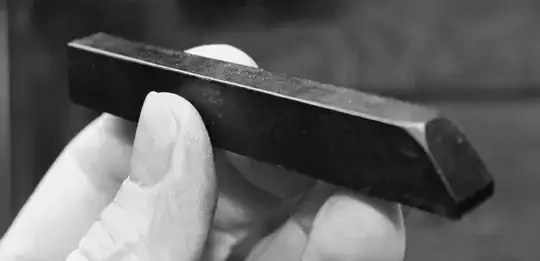
Picture of a black piano key

The closest I have come to achieving this is by first beveling the two front upper vertices in the corners using the Ctrl Shift B command. Then beveling all edges except the edges of the rounded corners. However, as you can see, the subdivided result is far from perfect!

Start Beveled vertices Beveled edges Subdivided

Maybe I should try a completely different approach? What do you Blender experts make of this?

Thanks in advance for any kind of input!

Glorfindel
  • 636
  • 1
  • 11
  • 18

1 Answers1

4

The algorithm used for subdivision surfaces works best with quads. You have many n-gons in your mesh, which will lead to artifacts.
enter image description here

You should at least convert the front and top face to quads. You can do that in two steps: select the top and front face and press [Ctrl+T] to triangulate them.
enter image description here enter image description here

Now select two triangles that you want to merge to a quad and press [Alt+J]. Repeat until you have no more triangles.
enter image description here enter image description here

To keep the edges sharper, add a bevel modifier on top of the subsurf. Now you can control the roundness / sharpness through the bevel's "Width" parameter.
enter image description here

The result should look like this:
enter image description here

maddin45
  • 4,804
  • 16
  • 21
  • I had no idea about this... It sure does look much cleaner, and I'm able to get these round corners. Thanks! However, in order to have the corners round, like in the picture, I have to set a pretty high width in the Bevel modifier. The problem is, all other edges needs to be sharper, and I have no idea how to achieve that. Using the bevel command, instead of the modifier, on certain edges doesn't give me the same result. Maybe I should explain further, and maybe some pictures, in a new post? – user2268171 Apr 28 '14 at 15:29
  • To get a perfect result you will probably have to apply the bevel modifier at some point and tweak the vertices by hand. You can also combine it with the technique @Thom Blair III mentioned in his comment to your question: changing the Edge Crease. If that doesn't help either, additional loopcuts near the edges will give them a sharper appearance as well. And in my oppinion a realistic material will influence the appearance of a model much more than the actual shape ;) – maddin45 Apr 28 '14 at 16:25