0

So I have this flat shape, and I'm trying to make it 3D. It's pretty round and has a ton of vertices. My end goal is to have the 3D shape with smooth edges.
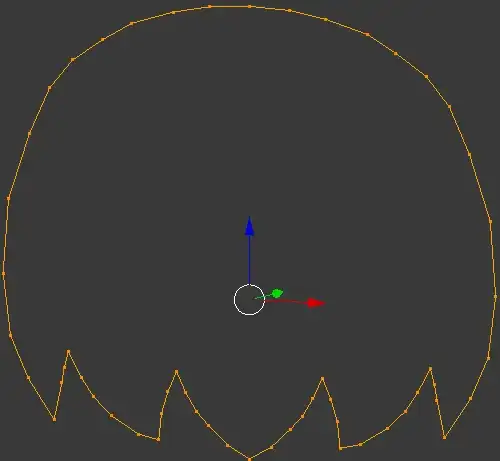
An outline of a round shape made with vertices

I approached this by pressing ALT+F to fill the shape. It created a bunch of faces that don't look too clean.
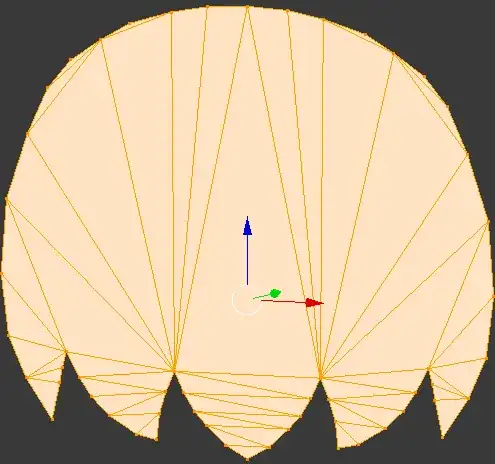
I filled the shape by pressing ALT+F

Then I extruded the shape once forward, and once back (from the original shape) so that it was "3D". This is close to what I want, but I want it to have a subdivision modifier, so the edges look smooth.
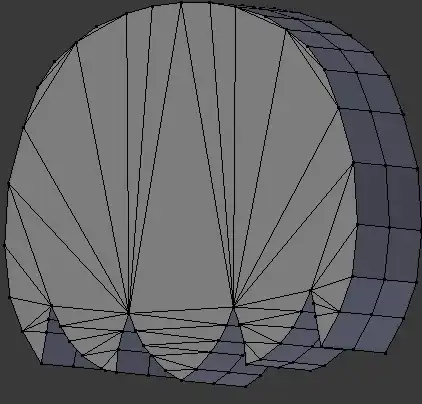
I extruded the shape to be "3D"

I then applied a subdivision modifier, and the shape just looks awful. Bumpy and ugly. When applying a subdivision modifier, the shape looks bad. Bumpy edges.
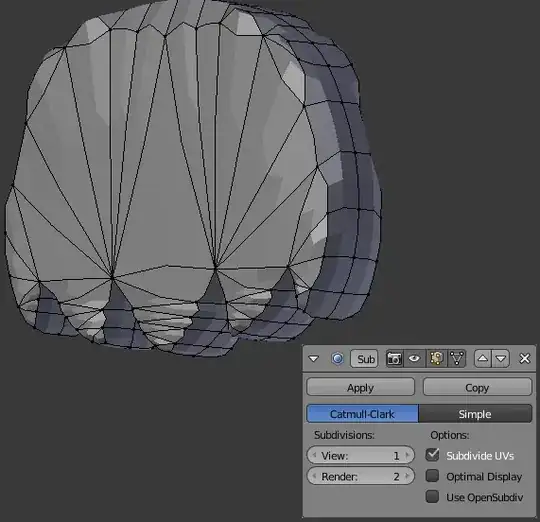
If I do "F" instead of ALT +F, it still produces a poor result. If I do "F" instead of ALT +F, it still produces a poor result
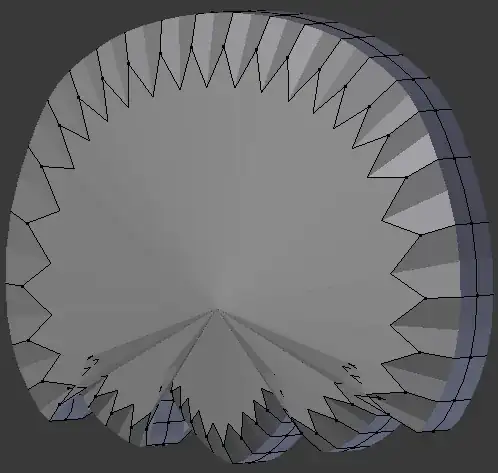
I've tried looking on this forum for solutions to similar issues, but so far not much has worked. I hope the images are enough to paint my issue, and give an idea of what I'm trying to achieve, any help would be appreciated.

  • 1
    This is topology issue. Subdivision Surface modifier do not work well with ngons and tris. – cgslav Jan 12 '18 at 01:14
  • Related https://blender.stackexchange.com/questions/82392/object-deforms-strangely-when-using-the-subsurf-modifier and https://blender.stackexchange.com/questions/34518/subdivision-surface-problem or https://blender.stackexchange.com/questions/82392/object-deforms-strangely-when-using-the-subsurf-modifier Also see http://topologyguides.com/ – Duarte Farrajota Ramos Jan 12 '18 at 01:34
  • @LukeD I'm not fully aware with how I would go about fixing that as I'm not necessarily familiar with ngons. – ChocoCopter Jan 12 '18 at 01:34
  • Please upload your file to: http://blend-exchange.giantcowfilms.com/ and maybe I could make something out of it. The main thing is that (as you should know from all the links that Duarte provided) you need quad based topology. – cgslav Jan 12 '18 at 01:41
  • @LukeD I appreciate your willingness to help. I added the link to the .blend file, if you figure it out, please share how you did so in detail so I can try it myself. – ChocoCopter Jan 12 '18 at 02:00

2 Answers2

2

topo

It's not the best topology but just quick example.

First thing I've done was to delete half of the mesh and add Mirror modifier to reduce work.

Next I've created Outer Edge Loop just by extruding vertices.

In the same manner I've filled rest of the mesh with faces with some Reduction Loops, this was needed for making all of the faces quads (more on this you can find on topologyguides.com).

I haven't used any "automatic" methods, it's just extruding E and filling F with a little help from F2 add-on. It's all manual work.

cgslav
  • 17,548
  • 2
  • 39
  • 82
  • I personally feel like this answer is the way to go. Especially if the OP plans to rig this model in some way. The TRI topology would make rigging and deformation a nightmare. – VampyreSix Jan 12 '18 at 17:13
0

Instead of adding a bulk of verts.

In the edit mode select the verts and make few edges

In the Transform panel. Select the outer edge and Make crease 1

Add subsurf modifier and extrude

enter image description here

atek
  • 10,006
  • 29
  • 91
  • 195