When i am rendering my scene in 1920×1080 at 100℅, and with a sample value of 500, I am getting a low qulality image which got rendered in just 8 seconds. How can I fix this!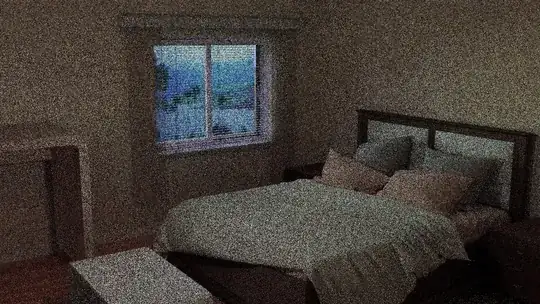
Asked
Active
Viewed 1,243 times
1

Amaljith Joseph
- 11
- 4
-
That is not low resolution, but not enough samples. 500 samples is not enough. try 2000 or more. – Mar 14 '18 at 15:57
-
2500 samples in 8 seconds? Wow. Either those weren't render samples or you have really decent hardware – Mr Zak Mar 14 '18 at 16:10
-
Also make sure that you are not using a lower number of samples in your render layers. That setting overrides all other values set in the render section. Read: Cycles render, noisy even when using a high number of samples – Mar 14 '18 at 16:18
-
My pc specs are 2GB ram, and internal intel graphics. And thats what i can't understand. Once it took me 2 hrs to render just one scene with 450 samples of 1080px – Amaljith Joseph Mar 14 '18 at 16:20
-
1https://blender.stackexchange.com/questions/53540/im-using-a-high-number-of-samples-why-is-my-render-coming-out-in-low-quality/53567#53567 – Mar 14 '18 at 16:21
-
2Did it really take only 8 Seconds? Did you accidentally set your preview samples to 500 and have your render Samples at .. maybe 3 ?.. :D – monatsend Mar 14 '18 at 16:28
-
that is not 500 samples. and no 500 will never render in 8 secs. Double check that you do not have a sample count overriding your 500. – David Mar 14 '18 at 17:55