2

I am trying to place multiple spheres on a circle ring but am finding it really hard to get them into position. Is there an quick method to accomplish this or is there a tutorial that teaches such stuff.

Below is a quick illustration of what i want to achieve

enter image description here

iKlsR
  • 43,379
  • 12
  • 156
  • 189

1 Answers1

2

Add a single sphere, and a curve to the scene (a Bezier Circle should do). Reduce the size of the sphere down to about 0.1 depending on the scale of the scene you're in.

Next, add an array modifier to the sphere and bump up the counts to about 10 or so you can see something. Finally add a curve modifier to the array of spheres. The spheres should follow the curve and you can now increase the array count depending on the scale of the sphere until both ends meet.

End result:
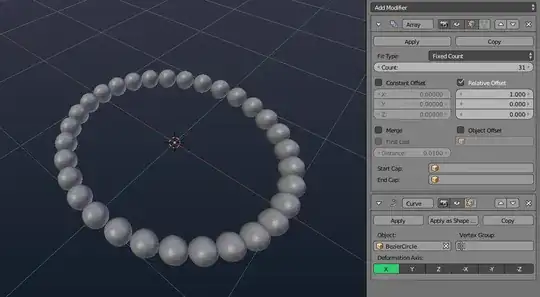
enter image description here

NB: If after doing this, the spheres don't connect at both ends evenly, just select the sphere in object mode and scale it slightly until they meet. You can also hold Shift while scaling for more precision.

An alternative (but more cumbersome) way is to use dupliframes, see How can I duplicate a mesh along a curve?

iKlsR
  • 43,379
  • 12
  • 156
  • 189
  • all the sphere are not similar shape . The front sphere are little bit elongated – atek Oct 31 '16 at 15:31
  • @atek Right, not counting the example image which is due to perspective the size difference is negligible. See the new blend I attached. For an alternative, see the marked duplicate. – iKlsR Oct 31 '16 at 15:38
  • i think i was wrong i take my words back. Due to image i have seen so i said it. I was searching for my answer i have posted http://blender.stackexchange.com/questions/66272/how-to-rotate-object-along-path-path can u plz help me to solve it – atek Oct 31 '16 at 15:44
  • @atek see the link in my answer. – iKlsR Oct 31 '16 at 15:46
  • i have tried about the dupliframes but i was not successful. can u plz take my file and show me a demo plz – atek Oct 31 '16 at 15:48
  • @ iKlsR as u have show me dupliframes i done with the path method but the problem is i cant delete the path and get the object to 1 single object i have posted my question plz go through http://blender.stackexchange.com/questions/66328/how-to-convert-path-to-an-single-object – atek Nov 01 '16 at 10:36