5

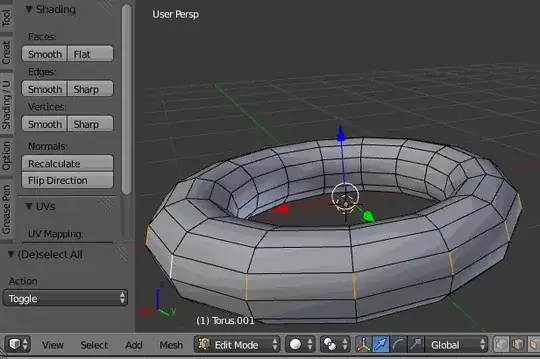
I have a spherically tapered cylinder that I'm trying to apply smooth shading to, partially. (Sorry for the terrible description, picture below)

enter image description here

I'm trying to apply smooth shading to vertical rings in the picture - I like the defined edges that run along the x-axis. I tried selecting only those rings in edit mode and applying smooth vertex, but that didn't appear to do anything. Will, I have to put in loop cuts for each x-axis line, then add an edge split with smooth shading to get my desired effect?

Helpful
  • 817
  • 2
  • 8
  • 8

2 Answers2

8

As of this commit (will be in blender 2.71), blender has support for split normals. You can download 2.71 release candidate 2 here.

  1. Set your object to smooth shading.

  2. Enable auto smooth in Properties > object data:

    enter image description here

  3. Select every edge loop and mark it as sharp:

    1. Press CtrlAltRMB on one of edge loops you want to make sharp to select that edge ring.

    2. Press Edge Loop in 3D view > Header > Select to select the rest of the loops.

    3. Press Sharp in 3D view > Tool shelf > Shading / UV > Shading > Edges, or press CtrlE> Mark Sharp:

      enter image description here

Result:

enter image description here

gandalf3
  • 157,169
  • 58
  • 601
  • 1,133
  • 3
    You really ARE Gandalf - the Gandalf of blender. Like... a wizard... like... that sounded better in my head. – Helpful Jun 17 '14 at 20:11
0

you just have to wait for 2.71 ! It has custom normals, so you'll be able to specify which edges are sharp, which ones are smooth. As of now we can't except with an edgesplit modifier which is destructive. Wait a few days ! ;)

Hadrien

Hadriscus
  • 793
  • 4
  • 11