3

enter image description hereBoolean Modifier and Subdivision Surface

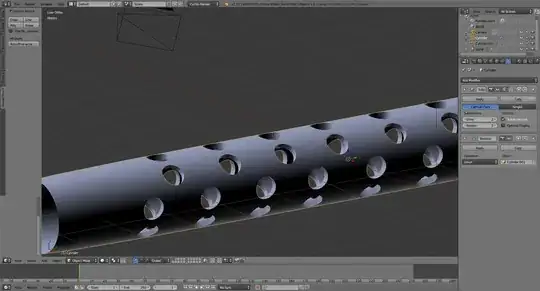
I am trying to cut numerous holes into a cylinder to create the barrel of gun. I used the Boolean modifier to cut the holes but now when I try to apply a subdivision surface to the cylinder I get horrifying results.

Would applying the subdivision surface first give better results or should I abandon the Boolean modifier entirely and opt for the knife project tool?

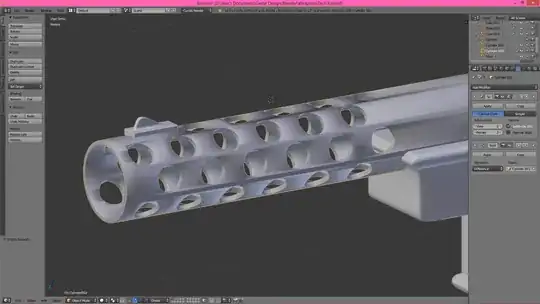
EDIT: Thanks to cegaton I am now able to cut the holes and use a subdivision surface. I still end up with an issue when smooth shading is applied though. enter image description here
David
  • 49,291
  • 38
  • 159
  • 317
user5199
  • 33
  • 1
  • 1
  • 4

2 Answers2

4

Invert the order of the modifiers, do the subsurf before the boolean.

Instead of this: enter image description here

Do this:

enter image description here

  • 1
    Thank you so much! That seems to work well, however, I still get some issues when smooth shading is applied. – user5199 Jul 14 '14 at 02:14
  • 1
    @user5199 Maybe this will help you: http://www.blendernation.com/2013/07/14/8-methods-of-cutting-holes/ pay special attention on avoiding ngons... –  Jul 14 '14 at 02:36
  • 1
    I've actually already seen that. I was hoping the Boolean modifier would work because it is easy. Thanks anyway, I'll try some of those techniques now instead of being lazy. – user5199 Jul 14 '14 at 02:39
  • 1
    related: http://blender.stackexchange.com/questions/5856/cutting-a-circular-hole-in-a-hollow-cylinder-without-distorting-the-cylinder –  Jul 14 '14 at 02:40
1

I subdivided the object that I wanted to subtract (In your case the "drillbit") and then applied the Boolean to my main object. This worked just fine and I have nice and smooth edges where I "cut" into it. I hope I didn't just repeat the prior answers and could maybe even help someone.

My order of things:

  1. Subdivision Modifier to main object (don't apply).
  2. Subdivide secondary object (apply Subsurf modifier).
  3. Add Boolean modifier to main object and apply it (with the secondary object selected of course).
  4. When you're done modeling, apply your Subsurf modifier.
Ray Mairlot
  • 29,192
  • 11
  • 103
  • 125
Solidifly
  • 11
  • 1