0

I created a mesh, then use particles to make grass on it. I just want to take the grass and grass's shadow on render, so I make the mesh's material become invisible (by using Transparent BSDF, alpha is zero).

But when the mesh become transparent, the grass's shadow is disappear too. How can I still get the shadow while the mesh is invisible?

I use Blender 2.70, Cycles Render
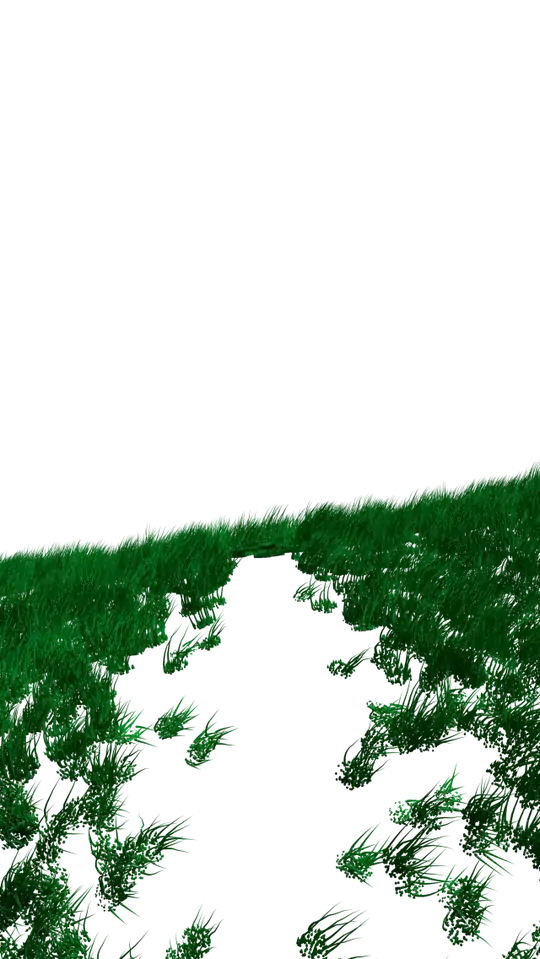
The grass's shadow is disappear when the mesh become transparent

Trung Dong
  • 63
  • 5
  • Thank you for fast replay. I tried it, but there is no "Set Alpha" node in my "Add > Converter" menu. May be in 2.7 version it has been deleted or renamed or something? – Trung Dong Jul 15 '14 at 16:20
  • @user2695076 Make sure you are using composite nodes – gandalf3 Jul 15 '14 at 18:41
  • What you are looking for is called a "shadow catcher". A transparent plane that receives the shadows of generated objects but is otherwise transparent. Read this http://blender.stackexchange.com/questions/10650/manually-make-it-look-like-an-object-is-going-through-the-floor-of-a-real-life and watch this video https://www.youtube.com/watch?v=k7gKzgvFiGM&feature=youtube_gdata_player –  Jul 15 '14 at 23:15
  • Wait, I just noticed that the example image is transparent. Do you want the shadows to be rendered over image alpha? Or do you want objects behind the plane to be visible? – gandalf3 Jul 15 '14 at 23:21
  • @gandalf3 I want the shadows to be rendered over image alpha. – Trung Dong Jul 16 '14 at 02:54
  • @cegaton Thank you! That link is exactly what I need! I tried and successful. – Trung Dong Jul 16 '14 at 02:56
  • @user2695076 :) Please feel free to write an answer to your own question so others can learn from it. –  Jul 16 '14 at 03:14

0 Answers0