I was just getting back into using Blender a few days ago and I must have hit a couple of buttons. But now I cannot get these dashed lines to go away. Does anybody know how I can make them go away?

I was just getting back into using Blender a few days ago and I must have hit a couple of buttons. But now I cannot get these dashed lines to go away. Does anybody know how I can make them go away?
It looks like you pressed ShiftT which enables texture space display and translates/grabs it.
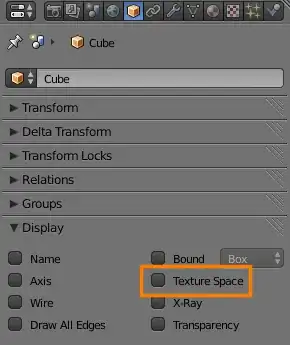
You can disable Texture space display in Properties > Object > Display:
In case you accidentally translated it, you may want to set it back to 0,0,0 in Properties > Object data > Texture space and re-enable Auto texture space:


