I would like to align the view straight on to a face, perpendicular to the normal. How do I align the 3D viewport to the face of a mesh?
Asked
Active
Viewed 6.0k times
63

-
4That's exactly what shift + numberPad 7 does as the answer below explains. If it's not working or not what you want, then please explain how what you want differs. – Ray Mairlot Aug 16 '14 at 15:10
-
Posting .gif of what I'm getting – GiantCowFilms Aug 16 '14 at 15:11
-
http://i.stack.imgur.com/SmC7v.gif. At the end of the gif I try to position the camera similar to how I want it. – GiantCowFilms Aug 16 '14 at 15:13
-
3that is object mode – David Aug 16 '14 at 15:13
-
1@David faceplam. Can't believe I missed that. – GiantCowFilms Aug 16 '14 at 15:15
2 Answers
78
In edit mode with a face selected press ShiftNumPad 7 That will align the view to the active face.
If you want to align the view to a different axis relative to the face, ShiftNumPad 1 and ShiftNumPad 3 can be used. Ctrl can be added to any of the key combinations to invert the view.
For example, CtrlShiftNumPad 7 will look at the "back" of a face.
For those of you without a numpad the same can be accessed through the menu.
From the 3D view header View > Align View > Align View to Active. Then pick the orientation you want (Top is used the most).
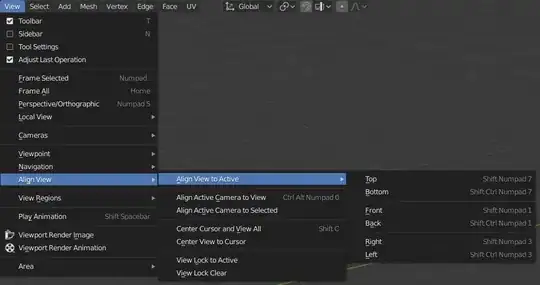
Do note that there can be faces that are not flat. In such cases the view will be aligned to the face, but any manipulation will warp the face.
This answer is valid for blender version 2.50 and up (including 2.8). For the 2.4 series the shortcut was ShiftV, but I doubt you wanted to know that.

David
- 49,291
- 38
- 159
- 317
30
Yes, ⇧ ShiftNumpad 7 will do this.

You may end up with a strange rotation around the view's local Z, in which case ⎈ Ctrl⇧ Shift Scroll can be used to roll the view to a more preferred orientation.
Also note that ⇧ ShiftNumpad 1 and ⇧ ShiftNumpad 3 can be used to align the view parallel to the normal. ⎈ Ctrl can be added in to align to the opposite side.

gandalf3
- 157,169
- 58
- 601
- 1,133
-
1
Ctrl + Shift + MMBdid not work for me - this zoomed in an awkward perspective. I usedShift + Numpad 4andShift + Numpad 6instead to roll the view. – TheEagle Sep 15 '21 at 14:49 -
@Programmer Oh sorry, its Ctrl + Shift + MouseWheel, I've edited MW to "Scroll" hopefully that's a little clearer. Also glad you found a solution! – gandalf3 Sep 21 '21 at 21:17