1

I have one .blend project where I've imported objects via .dae files. I've set up a scene and made animations etc...

Now there is a request to modify details of one or more object.

Question 1: Is there a way that I can replace my existing model with a newer version where I keep the location, rotation, scale and animations? Because now I need to delete the object, add it again and animate it again.

Question 2: For future projects, how do you set up a blender project to overcome such problems?

juFo
  • 1,037
  • 3
  • 14
  • 29

2 Answers2

2

There are a lot of ways. Two simple approaches (assuming you are talking about static meshes):

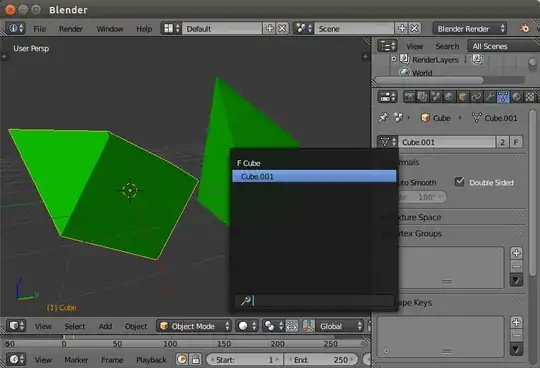
Switch the mesh in the Properties window - Object Data:

enter image description here enter image description here

Or if you have LocRotScale keyframed, switch the action in the action editor:

enter image description here

user2859
  • 3,612
  • 21
  • 21
  • thanks, works fine. additional info: you first need to add or import the object that you want to use. – juFo Sep 30 '14 at 09:35
1

You could convert the .dae file into separate .blend files and link (Menu: File/Link) instead of append into master file. In the master file you create the animations or pose-libraries needed. If the rig doesn't change you would be able to edit the mesh and just refresh the linked files. (The first related link has a more detailed and illustrated answer).

Related:

stacker
  • 38,549
  • 31
  • 141
  • 243