The simplest way to model a wedge in Blender is to start with a plane mesh object. Select two adjoining vertices, and duplicate them by pressing SHIFT-Dkey. Leaving the duplicated faces selected, select the other two vertices, and make a face. Change the pivot point to "Active element", and align the view so that the you are looking at what will be the side of the wedge. Enter rotate mode by pressing the "R" key, and enter the numeric value of the desired angle of the wedge. If the wedge is formed in the wrong direction, press the minus key. Make faces on the base, and two triangular sides of the wedge.
[NB: As an exercise in writing, I wanted to write this so it was clear enough to follow the directions without screenshots, though I didn't intend to not provide them. They will follow. I originally posted a method based on cylinders, which is described below. Although the one above is more versatile, there have been a few times when it would not have been as convenient in my workflow on the particular project at the time, so I have added the method above, instead of using it to replace the method below.]
As it turns out, a 30-60-90 degree triangle is trivial. Add a cylinder with three edges, and closed ends. Choose the two vertices that define an edge between the top and a side, set the pivot point to "median", extrude the two points, and merge them in the center. Repeat the process for the two vertices on the opposite edge of the four sided face. Make a face from the two vertices you created, and the pair of the vertices you did not extrude from, and a face between the created vertices and the two vertices on one of the edges that you did extrude from. Delete the pair of vertices on the corner you extruded from which you did not use to make a new face. You now have a 30 / 60 / 90 degree wedge. You can use this created wedge to make 15, 7.5, and 3.75 degree wedges by subdividing the small edge.
For wedges with other angles, change the number of vertices of the starting cylinder. Suppose you wanted a wedge of 12.5 degrees. Twice 12.5 is 25, and a cylinder with 72 vertices, will have and angle between adjacent vertices of 5 degrees, and the angle between on vertex and the fifth vertex away is 25 degrees. Create a capped cylinder of 72 vertices, selecting "triangle fan" as the cap type. Select all of the vertices of the cylinder, deselect the center vertices of the top and bottom caps, the two vertices defining one of the edges on the perimeter of the cylinder, and the two vertices defining the fifth edge (not counting the starting edge) from the first one around the cylinder, and deselect the two vertices that define that edge. Delete all of the remaining selected vertices, and you will be left with the two sets of three vertices which define a 25 degree angle, one directly above the other. Make faces along both sides of the angle. On the open end, select the top pair and bottom pair of vertices separately, set the pivot point to median, extrude the vertices, and merge the extruded vertices at the center. Join the two newly created vertices with one of the original edges, and delete the other. Make the necessary faces, and you have a 12.5 degree wedge.
By choosing the right number of vertices for your starting cylinder, most, if not all wedge angles can be created.


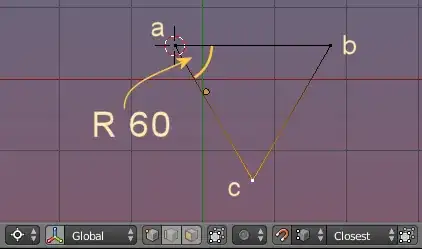


 In the 3D View turn on the N Panel (by pressing N), and scroll down until you find Mesh Display, within that there will be the Edge Info, which has Angle and Tick the box.
 Then, for the example above, just slide the two right most vertices along the X axis, until the numbers read the desired value.