You can use drivers on the Pos value.
All you need is a driving value.
Let's make the drivers from the group input. First enter the group node, select the Group Input node. In the sidebar (open with N). In the Node tab, you can add Inputs, name them and set their default/minimum/maximum values. I added two new inputs:

Get out of the node, right click one of the value inputs and hit Copy Data Path (here the White Posisiton):

Think of the Data Path is like the url of a website or the file path of a file on your computer, but here it's for any data on Blender.
Enter the group node, right click the Pos value corresponding to the data path you previously copied (here the white Pos) and hit Add Driver:
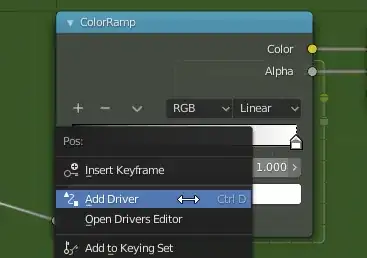
A pop-up will show to let you set your driver. Set it as I do:

- Type: Sum Values
- Icon next to "var": Single Property
- Prop : Material → select your material
- Path : paste the Data Path copied earlier
- Hit the Update Dependencies button
Note that once your driver is done, you can edit it via right click → edit.
And you can also copy-paste it from one value to another.
So if you want to create one for the black handle:
- right click the white Pos value → copy driver
- select the black handle, right click the black Pos → paste driver
- exit the node group and copy the Data path from Black Position
- enter the node group, right click the black Pos → edit driver
- paste the new data path
- hit Update Dependencies
And here's the result:


