20

For a scene, I have to change shader parameters (using nodes in Cycles) as time goes on in the scene.

I've looked for a node that inputs a time sweep or frame number, but neither is available in Cycles. Am I looking in the wrong place? Or is there a workaround/trick I don't know about?

nanofarad
  • 2,906
  • 3
  • 22
  • 33
  • You can also see http://blender.stackexchange.com/questions/164/can-modifiers-such-as-subdivision-and-array-be-animated/170#170 – iKlsR May 23 '13 at 16:39

2 Answers2

22

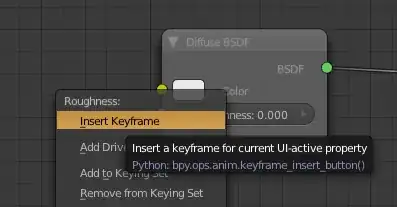
You can keyframe any value on the nodes by Right Clicking on the value and then choosing Insert Keyframe. This will set a keyframe on the current frame.

When you add a keyframe the field will turn yellow to indicate there's a keyframe on that frame. If you move along the timeline, the field will turn green to indicate the field is keyframed, but not on the current frame.

Inserting a keyframe on a node value

Jonathan Williamson
  • 6,426
  • 2
  • 32
  • 42
12

If you want to do this often and want to be even faster, you can also always just press I (as in "Insert Keyframe") while your mouse is over basically any value field/button/dropdown/selector/... in Blender and it will insert a keyframe for your current frame.

Press AltI to remove it again.

Thom Blair III
  • 16,535
  • 20
  • 75
  • 112
JulianHzg
  • 2,755
  • 18
  • 24