As seen in the beginning of this video, the smoke is colored based on its temperature. I know how to use the attribute to color smoke based on flame and density, but how can I use it to color based on the smoke's temperature?
Asked
Active
Viewed 3,912 times
4


-
AFAIK this isn't possible in cycles yet, that was rendered in BI. – gandalf3 Dec 02 '14 at 22:11
-
This question appears to be off-topic because it is a feature request. – GiantCowFilms Dec 03 '14 at 00:15
-
@GiantCowFilms I don't agree, how is it a feature request? – gandalf3 Dec 03 '14 at 00:16
-
@gandalf3 True.... it isn't directly asking for it to be implemented. – GiantCowFilms Dec 03 '14 at 00:17
2 Answers
8
Blender Internal
As GiantCowFilms said, this isn't currently possible in Cycles (but probably will be in the hopefully-not-too-distant-future). In the meantime, it is possible with BI:
Setup your simulation. See How to simulate a gas? and the wiki for more detailed info.
Add a new material to the smoke domain, set the type to volume, and set the density to
0(if you haven't already):
Note that this step is not needed if you used quick smoke to create your domain
Add a new texture, set the type to Voxel data, and select your domain object:

At the bottom of the texture settings, in the Influence panel, enable Density so that the texture influences the density of the texture:
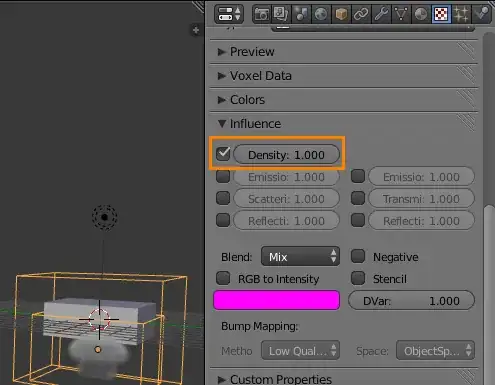
Add another new texture, again with the type set to Voxel data and your domain object selected. But this time set the source to Heat (there are also some fun options like Velocity). This will give you a black and white map of the temperature variations inside your smoke domain.
To colorize it, enable Ramp and set the color ramp to the colors of your liking. In my screenshot I moved the ends in a bit, as extreme temperatures like those at the ends of the ramp were not being reached in my simulation. (as an alternative to altering the color ramp, you could also increase the Contrast by adjusting the value slider below the ramp):
To make the color influence the color of the smoke, enable Reflection color and Transmission color in the influence panel:

Make sure the coordinates of both textures are set to Generated in Texture > Mapping. It should be by default, however I've noticed it behaving strangely recently (i.e. while writing this answer :P)
Result
(click on the image for a nicer version)

For some reason there is some flickering in the heat channel. I've noticed this with velocity before as well. (bug?)
Cycles
While it's not possible currently (as mentioned before), it is possible to create a similar effect to the video you linked in your question. By using the color blending features that were added since that video was made:
Set the color on the emitter objects:

This color can then be accessed via the attribute node:


1
This isn't possible right now in cycles. You will have to use the internal render engine. The feature will probably be added soon though

GiantCowFilms
- 18,710
- 10
- 76
- 138