3

I have this structure:

enter image description here

I want to place some tiles between the poles. As you can see I already started. I modeled a single tile, and I proceded to duplicate it and place it by hand until I got a section covered.

Now though, I obviously end up with sections of the tiles inside the mesh of the supports. I tried to fix this simply by erasing the exceding parts and trying to connect the remainings to the poles as best as I can. But I still end up with some intersecting mesh. When I render it it doesn't look extremely bad, but it's not exactly perfect. And I'm also worried about texturing.

I was wondering if there was a better method to achieve this; To have the tiles connect to the poles but without intersecting or going so far as to have sections of tile inside the poles.

For the smaller poles intersecting the bigger ones I had the same problem, I resolved it with the boolean modifier. But it wasn't that easy since I ended up with lots of triangles on the meshes that I fixed by hand. I also have some disconnected parts, hardly noticeable though.

This is the blend file: http://www.pasteall.org/blend/33562

Paul
  • 952
  • 2
  • 11
  • 26
  • Have you tried an array modifier? – ruckus Dec 27 '14 at 16:05
  • It's not really a question about placing the tiles faster, but how to avoid having them clipping with the structure. – Paul Dec 27 '14 at 16:06
  • In a real pagoda, where are they attached? are there notches into which they fit upon the poles? – ruckus Dec 27 '14 at 16:31
  • I don't know, by looking at some photos, tiles seem to be held toghether with concrete or something like that. – Paul Dec 27 '14 at 17:34
  • First off, use curves and an array modifier. You can then set the end cap, which you can edit to fit with the poles on the roof. – J Sargent Dec 27 '14 at 19:35
  • P.S. Use mirror modifiers on the X and Y axis, that way you only have to model one quadrant of the roof. – J Sargent Dec 27 '14 at 19:36
  • Look who knew what he was talking about! WOOO-HOOO. I would also make the poles After making the tiles. This would allow easier, more realistic construction. – ruckus Dec 27 '14 at 19:41
  • @NoviceInDisguise: Yeah, I was thinking about using the mirror modifier. About the curve, you mean tie a mesh to a curve modifier or solidfy the curve? – Paul Dec 27 '14 at 19:58
  • @VinceScalia: Yeah I was kind of half asleep while writing that. Could you expand on what you would do? Place the tile in the shape I want and then add the poles or...? – Paul Dec 27 '14 at 19:59
  • Curve modifier, to deform to the curve. Just makes it easier to move it around and get it perfect. – J Sargent Dec 27 '14 at 20:44
  • So you're suggesting to have a curve tied to every tile and change it when needed, right? – Paul Dec 27 '14 at 20:57
  • Each string of tiles, created by an array modifier. A cool feature of the array modifier is that you can select a mesh to be the end cap, so you can edit it to fit with the geometry of the roof. – J Sargent Dec 27 '14 at 21:35
  • That's not working. I set two supports as start and end, and all I get is some strange bent tubes appearing from nowhere. – Paul Dec 27 '14 at 22:09

1 Answers1

7

To summarize all this chat into a single answer:

Crate the tile pieces you need:

enter image description here

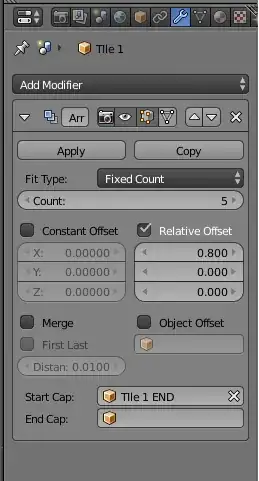
Add an array modifier and make the relative offset a bit smaller than the size of the tiles, so they overlap (I used 0.8 in this example) Use the "end tiles" as Start Cap:

enter image description here

enter image description here

Using the selected object press Shift S and select "Cursor to Selected" so that the cursor goes to the origin of your object.

Add a curve.

IT IS IMPORTANT THAT THE OBJECT AND THE CURVE HAVE THEIR ORIGIN IN THE SAME PLACE

Edit the curve to the shape you need.

enter image description here

Add a curve modifier after the array modifier, and select your curve as object and choose the deformation axis you want to use (in this example it follows the X axis).

enter image description here

enter image description here

The tiles array should bend now following the curve like this:

By alternating different arrays you get an idea of what the rooftop might look like.

enter image description here

By changing the count number on the array you should be able to follow the overall structure of the pagoda.

Getting the right number of tiles to fill the shape might take some trial and error. You might need to go back and re-shape the length original tiles to fit an exact count you need to fill the rooftop.

enter image description here

The edges of the tiles you can just hide on the overall structure of the roof. Like in the photo on this link.

or this image:

enter image description here

But for those purists who don't like shortcuts. You can do a bit of extra work and prepare a tile that is cut in an angle that follows the shape of the rooftop.

enter image description here

enter image description here

enter image description here