You would have to declare a CollectionProperty and assign its type to a previously declared PropertyGroup to hold multiple generic entries. Demo based on the code provided in the docs:

bl_info = {
    "name": "Example Add-on Preferences",
    "author": "Your Name Here",
    "version": (1, 0),
    "blender": (2, 80, 0),
    "location": "",
    "description": "Example Add-on",
    "warning": "",
    "doc_url": "",
    "tracker_url": "",
    "category": "Development",
}
import bpy
from bpy.types import Operator, AddonPreferences, PropertyGroup
from bpy.props import StringProperty, CollectionProperty
class CUSTOM_PG_filepaths(PropertyGroup):
    # name: bpy.props.StringProperty()
    path: bpy.props.StringProperty(subtype='FILE_PATH')
    display: bpy.props.BoolProperty()
class ExampleAddonPreferences(AddonPreferences):
    # this must match the add-on name, use 'package'
    # when defining this in a submodule of a python package.
    bl_idname = name
filepaths: CollectionProperty(
    name="File paths",
    type=CUSTOM_PG_filepaths)

def draw(self, context):
    layout = self.layout
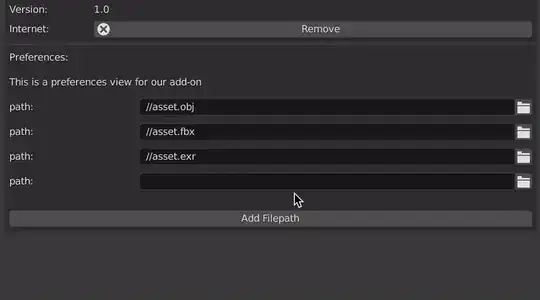
    layout.label(text="This is a preferences view for our add-on")
    for i in self.filepaths:
        if i.display == True:
            layout.prop(i, "path")


filepath_list = {
    "geo": "//asset.obj",
    "anim": "//asset.fbx",
    "render": "//asset.exr"
}
def register():
    bpy.utils.register_class(CUSTOM_PG_filepaths)
    bpy.utils.register_class(ExampleAddonPreferences)
paths = bpy.context.preferences.addons[__name__].preferences.filepaths
if not paths:
    for key, value in filepath_list.items():
        item = paths.add()
        item.name = key
        item.path = value
        item.display = True


def unregister():
    bpy.utils.unregister_class(ExampleAddonPreferences)
    bpy.utils.unregister_class(CUSTOM_PG_filepaths)
If you'd like to allow the user adding an arbitrary amount of filepaths, you can display the contents of the PropertyGroup in a custom UIList which will look like the material list, see:
Create an interface which is similar to the material list box
Alternatively you can just add a simple operator to add a new item:
class OBJECT_OT_addon_prefs_example(Operator):
    """Display example preferences"""
    bl_idname = "object.addon_prefs_example"
    bl_label = "Add-on Preferences Example"
    bl_options = {'REGISTER', 'UNDO'}
def execute(self, context):
    preferences = context.preferences
    addon_prefs = preferences.addons[__name__].preferences
    item = addon_prefs.filepaths.add()
    item.display = True

    self.report({'INFO'}, "New Filepath added")
    return {'FINISHED'}


