3

I am working with mesoporous silica, a material based on tubular voids or rod-like internal spaces, where different molecules can be loaded. I managed to do this in 2D, but I would like to "jump" to the 3D

Any idea how shall I proceed?

Thank you in advance

enter image description here

Edu39
  • 301
  • 1
  • 8

1 Answers1

6

Create a 6 vertex circle, right click and subdivide (all the parameters are in the Operator box on the bottom left of your 3D view):

enter image description here

Extrude inwards (press EEnter then Scale with S) and make the edge loop a circle with the LoopTools addon (activate the addon and right click > LoopTools > Circle):

enter image description here

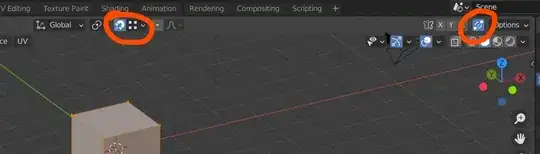
Activate the Auto Merge and Snap to Vertex options, duplicate your mesh and stick the duplications:
enter image description here

enter image description here

Extrude downwards (E and move the selection along the normals), in Object mode right click > Shade Smooth and in the Object Data panel > Normals, enable the Auto Smooth option:

enter image description here

moonboots
  • 155,560
  • 7
  • 105
  • 171
  • +1 ...and i thought that were half spheres looking out of the mesh....‍♂️ but he has 7 holes...yours just 3 ;) – Chris Oct 11 '21 at 09:57
  • "half spheres looking out of the mesh", what do you mean? – moonboots Oct 11 '21 at 10:09
  • i meant like that: [1]: https://i.stack.imgur.com/fOe2d.png – Chris Oct 11 '21 at 10:13
  • oh yes I was also wondering but it looked like holes to me, I've just checked – moonboots Oct 11 '21 at 10:15
  • I have one question, I managed to draw the hexagon but I have no idea how to "extrude inwards" in the second step. Thanks again – Edu39 Oct 11 '21 at 10:22
  • you need to press E and Enter, then S to scale – moonboots Oct 11 '21 at 10:27
  • Great, thanks a lot! – Edu39 Oct 11 '21 at 10:37
  • @moonboots, Could you a bit more in detail the Auto merge part? – Edu39 Oct 11 '21 at 12:23
  • @ Edu39, I've edited my answer to show where you'll find the Auto Merge option (top right of your 3D View), it will allow you to automatically merge the vertices when they will snap (you can enable the Snap option (magnet icon) or press Ctrl to automatically snap, make sure that yoiu have selected Snap to Vertex in the dropdown menu on the right of the magnet icon) – moonboots Oct 11 '21 at 12:30