5

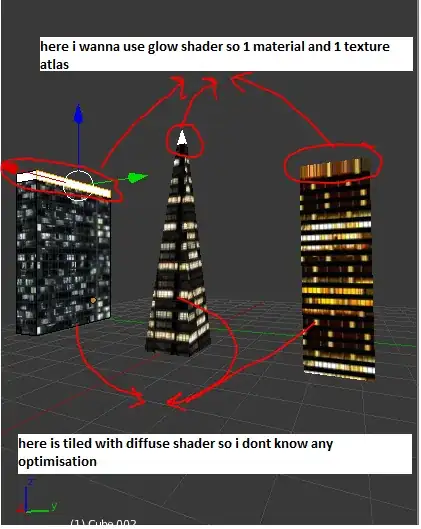
i want to make buildings in blender and export it to unity , i want the draw calls and texture space to be as low as possible so so what i do is i will put tiled textures on side of buildings (because they can be high rise buildings) but i want to make a texture atlas for buildings roofs and other smaller parts , so my question is how can i make one big texture for my smaller parts of building like roofs and use tile texture for the building sides should i make 1 uv map for roofs and 1 for each building tiling texture

here is a picture to clarify enter image description here

i want to use differrent shaders too
enter image description here

Milad Qasemi
  • 403
  • 2
  • 6
  • 12

1 Answers1

7

If you mean like the followingenter image description here...

To start with, select all the faces in Edit mode and press u. This opens the UV Mapping dialogue. Select the very bottom entry which is 'Reset'. This will pack all the quads tightly and they will be overlapped.

The reason I said to select everything to start with is because the tools will act on all faces when a new uv layer is first being created. They tend to ignore selections on the first pass so you can just unwrap everything as a group and then work on them individually afterwards.

So now, make sure everything is selected and move this block of faces out of the 0-1 UV space so you can work on the faces that will be non-repeating.

Now select one of the roof top pieces and use Select Similar-> Normals Shift+g. This should select every face that is facing upwards since they have similar normals.

Now access UV Mapping again u and this time try "Unwrap", it should produce evenly spaced UV faces that match the proportions of the faces that are selected.

enter image description here

Now use box select, circle select or whatever your favorite selection tools happens to be and use that to move all the side pieces back into the 0-1 UV space. Resize them to fit in there somewhere and you should be ready to go once you have the texture ready.

enter image description here

UPDATE: If you have uv's that are scaled beyond the 0-1 range then you can add extra UV layers.

For the next image, you can see three UV layers. One is for the roof, one for the walls, and a third for the bakeTo coordinates that will be used to combine everything into one final material/texture so the models can be exported to an external game engine as one asset.

enter image description here

Now you can add two materials, one for the roof and one for the walls. Set both materials to 'Shadeless'. The check-box is on the same tab with the other material settings.

enter image description here

Now add each of the textures to the respective material and be sure to select the proper UV coordinates or Blender will pick one for you and you may not like the choice it makes. :)

enter image description here

Now verify using the Object Data tab(the one left of the Materials tab with 3 dots forming a triangle) that you have the bakeTo UV coordinates highlighted, also make sure the camera icon is selected. Now find the Bake section under the Render tab and change this to full Render. I always set the margin to 64 pixels. Also, make sure that 'Selected To Active' is off. So long as you have already assigned a texture to the BakeTo UV coordinates in the UV Image Editor all the materials and their textures should transfer over to the bake texture and will all be in the 0-1 space and all together in one image. Here's the final result that uses the UV coordinates that I showed how to make in the first part.

enter image description here

MarcClintDion
  • 9,641
  • 5
  • 32
  • 58
  • thanks for great explanation but i have some questions , now they are in same uv map , right so i cant make tile texture for my sides because for tiling my uv must be bigger than my picture like this – Milad Qasemi Feb 02 '15 at 09:04
  • Alright, I was going to mention something else but I wasn't sure if you would need that but you do. As it stands, if you want to do it that way then I think you would likely have to have the roofs as separate models so there would be separate draw/texture calls. I think there is a solution to this that should work for you. Actually, could you upload the .blend file and pack the textures in,otherwise I have to search for textures and try to reproduce your setup.You can load it to Pasteall.org and paste the link.I'll get back to you in a while with an updated answer to reflect this new info. – MarcClintDion Feb 02 '15 at 09:09
  • i am aware of extra draw call but i chose that over the extra polys and some of my building are not cubical so i it was better to have tiled , i don't know if it is the best solution , one thing else is i want to have another shader for roofs and it is another reason i wanted them seperate – Milad Qasemi Feb 02 '15 at 09:14
  • i dont really got anything setted up i only got my side textures , so i putted them here – Milad Qasemi Feb 02 '15 at 09:26
  • I found some, it turns out that there are lots of textures available for this. – MarcClintDion Feb 02 '15 at 09:51
  • can you see my edits and give your opinion of the best way of doing that – Milad Qasemi Feb 02 '15 at 09:57
  • The big factor here is texture resolution and texture calls. They are likely to be the one of the bottlenecks. The way I decide what should be separated is often based on how much surface area a model has since this uses up texture resolution but this is not the issue for you since you are using repeating textures. It's also recommended that you go for a few high-poly draw-calls vs. many smaller ones because this causes the GPU driver to overburden the CPU. GPU's tend to be very good at dealing with high-poly models so long as you don't get silly with that. – MarcClintDion Feb 02 '15 at 10:03
  • so should i use tiling or not , you know the situation , so what is the best approach(what you will do for something like this) – Milad Qasemi Feb 02 '15 at 10:11
  • I've been working on a 100% Cycles GI baked lighting which means that tiling textures can never be used as a final asset but I do use tiling for generating the base color textures for terrain like rocks and dirt, etc... But exporting unique textures this way can end up using a whole lot of HD space and it also increases asset management troubles. If you are just starting out, do what feels right and don't get caught up in the idea that you will make some horrible mistake. Try to finish something and you will have learned enough to branch out into other techniques the next time around. – MarcClintDion Feb 02 '15 at 10:36
  • If you have access to a couple different weak computers that were not made for games, use them to benchmark all the changes that you make in Unity. Weaker computers tend to show flaws in your techniques much sooner than an expensive computer would. This way you won't get too far along and then realize too late that you are doing something which will cripple many peoples computers. – MarcClintDion Feb 02 '15 at 10:39
  • actually i dont want to bake the textures to the models , i assign the textures after exporting so tiling wont take texture space – Milad Qasemi Feb 02 '15 at 10:40