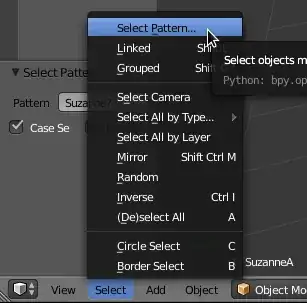
I made an asteroid belt from a particle system. Lets say there are 2500 individual asteroids. There are 9 unique models. All the objects are named AsteroidA_LP..., AsteroidB_LP..., etc. all the way to AsteroidI_LP. That makes about 277 asteroids of each type that I need to select so that I can combine them into one object for each different type. I hope to end up with 9 objects, each containing the same type of asteroid that is UV Mapped the same.
I don't know the best way to do this. Here is what I am doing which beats Shift LMB clicking each one.
I have expanded the Outliner is large as I can. I LMB click to select the first object. I press B and drag a box selection across as many of the same type that I can and then I scroll the outliner and repeat the process until I have all the AsteroidA_LP objects selected with a shade of light blue. Once I have all the objects selected in that manner with box select then I RMB click and choose to select the objects and then press Ctrl+J to join all the objects together.
Is there a faster way?