1

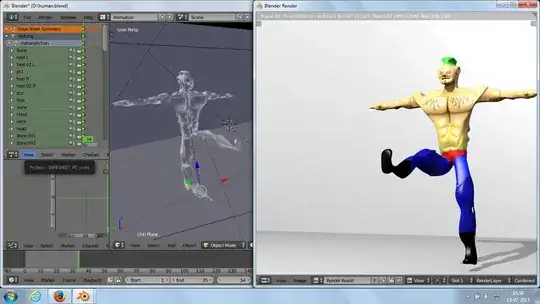
Under Animation Screen layout when I position camera towards my model and render the image.It's not as I expected.

Example: Suppose If I lift my right leg,in Rendered Image it's showing as left leg. Further if I need to see right body of my model I need to place camera on left side.Help me in rectifying it.

If you mark this question as duplicate please guide me to the correct answer i.e. share link of it if you knew. Thanks in advance.

enter image description here

enter image description here

enter image description here

enter image description here

Lambo
  • 43
  • 1
  • 5
  • You need to rotate the character . . . this is standard behavior, Blender has a global coordinate/view system, so what things are named or how they are oriented locally will never change that setup. Think of it as North, East, South and West, with the Z axis as up and down. No matter what way you face, West is still West. So when you change the view to the "Left" side, it might not be the left-hand side of the character/mesh. – J Sargent Feb 12 '15 at 19:28
  • Hello Thanks for your comments.

    @someonewithpc: From last week only I am using this software.I am not an professional in it.I am a newbie. Thanks

    – Lambo Feb 12 '15 at 19:49
  • @Lambo Could you post some screenshots? – someonewithpc Feb 12 '15 at 19:53
  • @someonewithpc as requested pls c screen shots.Do I need to modify any settings? – Lambo Feb 12 '15 at 20:01
  • 2
    any compositing? (flip node, scale node with neg X) – Bithur Feb 12 '15 at 20:06
  • 1
    @Lambo Oh.. It's not at all what I was thinking... Could you post your blend file, so we can try to locate what's wrong? – someonewithpc Feb 12 '15 at 20:17
  • Editing the question to say "solved" is not proper, if the answer was not already here, you could of added that as a answer to your question. – David Feb 12 '15 at 21:23
  • @David Apologize I answered the same and removed it from question – Lambo Feb 12 '15 at 21:36
  • No problem, you did not know the SE format. We all had to learn sometime. PS you can accept my answer scene it is the answer to your question. – David Feb 12 '15 at 21:43

2 Answers2

3

I think you may have accidentally scaled your camera to a negative number. With the camera selected, open up the properties panel with N and see if the camera's scale is anything smaller then 0.

If you have scaled the camera, then just make the X axis a positive number again, and your render will work as excepted.

There really is no reason to have the camera scaled to anything but 1, except if you are looking to flip the image. However if a three axis have a negative number, after changing the camera's scale you will have to reposition the camera.

David
  • 49,291
  • 38
  • 159
  • 317
0

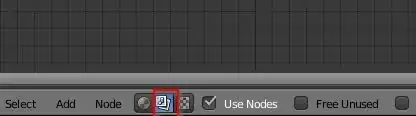
It looks like your render is flipped. Check your compositing (nodes) for flip node or scale node (with -1 X value)

change the viewport to Node Editor: enter image description here

go to compositing

enter image description here

Check if you have one of these nodes: enter image description here

Bithur
  • 8,274
  • 19
  • 56