 So I decided to make some tubes. In the olden days I used to add a bezier curve I could convert or whatever, but now all I get from a bezier curve is a single path. Than I stumbled over this https://github.com/zeffii/TubeTool on youtube. What are the right exact steps to do that? I opened the zipfile and clicked on the elements...nothing happened. Do I need to "go to file" or what? I´m using a mac by the way.
Asked
Active
Viewed 449 times
2

Irenäus Blaszkiewicz
- 811
- 2
- 8
- 24
-
2You really don't need an addon to create pipes. See this video https://www.youtube.com/watch?v=Ve9h7-E8EuM for instance. – John Eason Jan 27 '22 at 23:50
-
2Does this answer your question? How to download and install an add-on hosted on github properly? – p2or Jan 28 '22 at 05:49
-
@MartyFouts Sorry, don't get it. What's wrong? – p2or Jan 28 '22 at 16:49
-
Yep, has been renamed to 'Code', I took care of it. Better? Could you please add the proper windows path? Linux here... Win 10 should be good. @MartyFouts – p2or Jan 28 '22 at 17:52
-
@MartyFouts "download the zip" is already part of 3, should we make it bigger? In this case there is a release available that's the way to go so I don't see why to rewrite the post massively. It's hard to cover all cases but I think that's a good start. The paths for linux and OSX are fine. What tool has changed? What answer to which problem? – p2or Jan 28 '22 at 18:24
-
Let us continue this discussion in chat. – Marty Fouts Jan 28 '22 at 18:25
-
That youtubelink above is pretty good. – Irenäus Blaszkiewicz Jan 28 '22 at 23:07
1 Answers
1
You can install TubeTool in 2.93 and it will work fine.
Go the TubeTool GitHub repository
Click on the "Code" button and select "Download ZIP" and download the file TubeTool-master.zip
In Blender edit your preferences, go to addons and select Install
Navigate the file browser to the folder where you downloaded the file and select TubeTool-master.zip
Eventual the Tube Tool Entry will show up. Enable it:
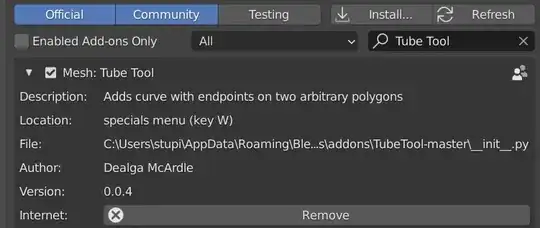

To use the tool you must be in edit mode. The web site says it uses the "W" menu, but in 2.93 that's actually the Right Click context menu. Tube Tool should be the first entry. It's called "Add Tubing".

Everything seems to work as described in the README.md file.

Marty Fouts
- 33,070
- 10
- 35
- 79