So a large part of your problem is that you have a mesh with "Thickness", in that it has more than one side to it, but both sides of the mesh are sitting on top of each other.
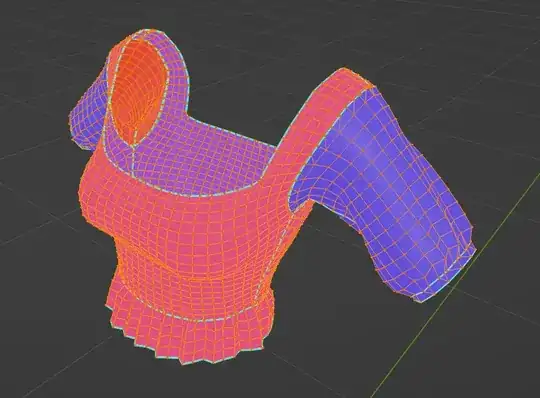
Either than or you're doing this on purpose and they are intended to be two separate articles of clothing.

In any case however you will need to give the clothing some kind of thickness. Use a solidify modifier for that.
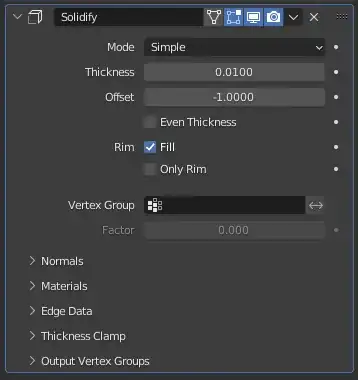
Adding a sub surf on top of that helps to smooth it out.

Before you get to into that though, you will need to clean up the mesh quite a bit. Im not sure if you're meaning to do some kind of "stitching" like a Marvelous designer workflow, in which case you would probably want each patch of the clothing to be separated. But if you're trying to bake it makes me think that maybe you are already done modeling. In which case you would want to "stitch" this together and make it look like how it would in real life.


One workflow or the other, you want to pick a side and go that route all the way.
I wouldn't really worry so much about reducing geometry either by turning all this into triangles, it just makes working with the mesh so much harder.

You're saving like maybe 20 tris here, which is an amount that a 12 year CPU can process in .2 nanoseconds, meanwhile making it significantly more difficult to edit. It's not worth it.
Then once you clean that up and put the solidify, subsurf modifiers, etc. on there you get something like this.
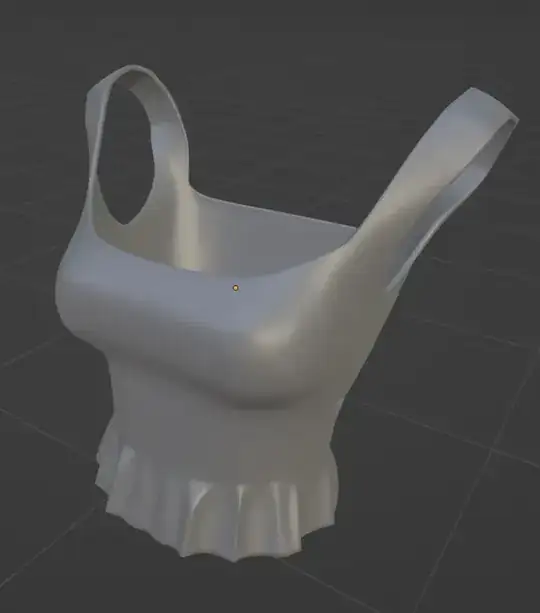
All clean, connected where it needs to be, no random disconnected vertices etc.

Looking at your blend file you don't seem to have a high poly, or anything to be baking from. At least from what I can tell. Maybe that's missing from the file. Not sure. Usually baking is for when you have some kind of detail (Normal, Diffuse, AO, etc) that you want to transfer from one mesh to another in image form. I know you get that at least, but there's another piece of the puzzle missing.
So say you're just going through the basic baking workflow. at this point you would duplicate this mesh you just cleaned up. Take off the subsurf modifier from that one. Call that the "Low Poly" and bake whatever details you want from the High poly mesh to the Low.
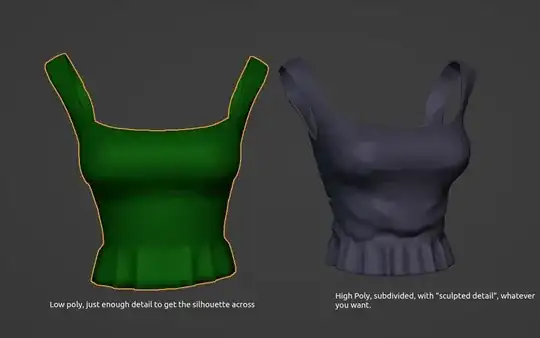
Put em on top of eachother, make sure they match as close as possible and then bake em. That should do the trick.


