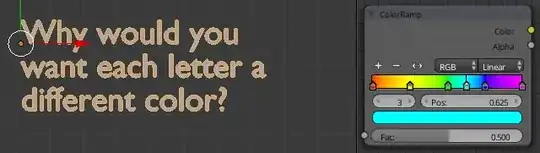
I think an image can say more than words sometimes... :)

The idea is to use a different color from the color ramp for each character in the string.
It's related to this question
Asked
Active
Viewed 397 times
2


-
so you need the index of the currently rendered character not just the char index – Chebhou Mar 17 '15 at 16:32
-
i guess you're right :) – Bithur Mar 17 '15 at 16:33
1 Answers
4
The color of each character is determined by the material index on the text object. Therefore, to have each character use a different color from the color ramp requires a material for each color.
The steps involved:
- A material for each color in the color ramp node.
- The text object must have all the materials applied to it.
- The characters must reference the index of the materials.
This script takes the colors from a color ramp node, makes new materials and then assign each character a material.
import bpy

txt = 'Text' # The name of text object and text curve.
materials = bpy.data.objects[txt].data.materials
i = 0

# This material holds the color ramp node, change 'material name' to the name of your material.
rampMat = 'material name'
colorRamp = bpy.data.materials[rampMat].node_tree.nodes['ColorRamp'].color_ramp.elements

# Convert colors from the ramp to materials and add them to the text object.
for element in colorRamp:
    color = element.color
    material = bpy.data.materials.new('color')
    material.diffuse_color = color[0], color[1], color[2]
    materials.append(material)

# Loop through the characters setting their indexes.
for character_format in bpy.data.curves[txt].body_format:
    character_format.material_index = i % len(materials)
    i += 1


David
- 49,291
- 38
- 159
- 317
-
-
@Chebhou it was a little tongue in cheek, I just wrote the script to do exactly that. – David Mar 17 '15 at 23:30
-
This looks like what i wanted, with some awsomeness, thanks!! I'll check this tomorrow. If you want to animate this, you can answer this question too :) – Bithur Mar 17 '15 at 23:57
-