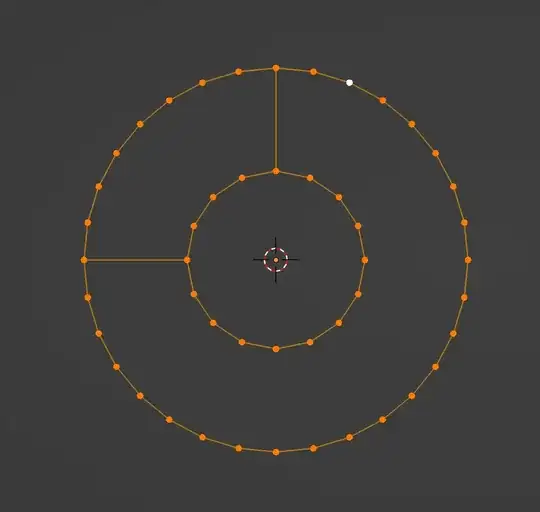
What I want is a shape like that,the outter and inner are complicated shape,not just circle,with different dots,only 2 ngons can fill the hole.
But when I start from just 2 lines,I can't make those 2 ngons easily.
- 958
- 2
- 12
-
Blender faces can't have unsupported holes. Is this the problem? A picture of the desired result would help. – Robin Betts May 01 '23 at 07:19
-
1@RobinBetts what I want is the 1st pic,I made it by boolean,so I think it can be done by fill,some ways. – NatureK May 01 '23 at 08:44
3 Answers
I don't quite know if this is what you mean.. but if you have a 2D curve comprising 2 cyclic splines, the Boolean will automatically be taken:
If the curve is given a Decimate > Planar modifier, then 'Convert to Mesh' will result in a minimal number of edges coonnecting the hole to the perimeter:
- 76,260
- 8
- 77
- 190
-
-
@NatureK can you describe, how this is not what you want? This is exactly how I understood your question. You have an inner curve (you call it a line), and an outer one, in your example those were 2 circles, but you mention in reality they are complicated shapes (so Robin made the inner curve complicated), and then he filled the space between them with 2 ngons, as you asked. The edges separating those ngons are highlighted. – Markus von Broady May 02 '23 at 10:38
-
1@MarkusvonBroady Assuming that I have a complicated model,and a part of it is a hole like that,so I need to fill it.Curve is OK in some cases,but it's not reasonable to convert the whole mesh into curves.So whether I can make it in mesh not curve?Now I think the only way is seperate the mesh,fill the hole and join them back to the mesh. – NatureK May 03 '23 at 03:52
Use bridge edge loops to start with

Select all the created edges by clicking one of them while holding ctrl+alt

Then dissolve them with ctrl+x and turn off Dissolve Vertices in the popup menu

- 2,319
- 8
- 13
-
The outer and inner circle have different vertices,bridge will have trouble.If I have many vertices,it looks unreasonable to do it manually. – NatureK May 01 '23 at 08:46
-
Another technique I use is when making text, I'll post an answer with that workflow – Psyonic May 02 '23 at 08:50
When creating text I sometimes use this workflow for complex fonts:
I get to a point where I have only the boundary edges, then get the internal edges and move them off plane


Then extrude the inner parts that were moved off plane so they inetrsect the rest of the text

Then with all the extruded parts selected use Intersect Boolean to cut out the holes

Sometimes it leaves some of the faces but they can be easily deleted

There are many hot keys and small techniques to speed this process up
Hope this helps you somehow
- 2,319
- 8
- 13