You can find add-on templates in the Text Editor's Templates menu:
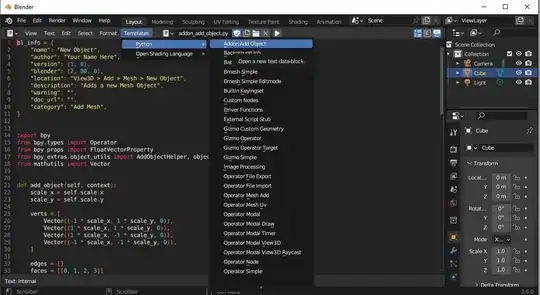
So that's a basic example of how you can write an add-on. Writing CSV is absolutely the same form an add-on as from any other Python script. There are many ways to do so. You could use pandas(need to install the module for Blender's Python in that case) library to work with your data and then save it to CSV with pandas, you could just use csv module as well:
import csv
with open('csv_file.csv', 'w', encoding='UTF8') as f:
    writer = csv.writer(f)
    writer.writerow(["A", "B", "C", "D", "E", ""])
or since CSV is just a text file you could simply write it the same way as you would write any file with Python
So let's say I want to output all my selected objects to a CSV file C:\temp\a.csv and I want to have their names, types, location, rotation euler and scale:
import bpy
import csv
sel = bpy.context.selected_objects
with open(r'C:\temp\a.csv', 'w', encoding='UTF8', newline='') as f:
    writer = csv.writer(f)
    writer.writerow(["Name", "Type", "Location", "Rotation", "Scale"])
    for o in sel:
        writer.writerow([o.name, o.type, o.location[:], o.rotation_euler[:], o.scale[:]])
And here is the output:


python csvlooks like a nice starting point: csv — CSV File Reading and Writing — Python 3.11.4 documentation. Reading and writing a csv isn't about how to use Blender, so we can't really help here. And no matter the subject, if you need help, you gotta start somewhere for us to be able to help more than throwing search links ;) – L0Lock Jul 18 '23 at 17:52