1

enter image description here

Blender version 3.5.1. I made an ocean. I appended a unicorn model into it.

When the world scene light is on the unicorn loses its texture but not colour.The texture's there with the world scene off. It's the same in rendered preview and material preview.

Any ideas why this is happening?

Duarte Farrajota Ramos
  • 59,425
  • 39
  • 130
  • 187
Schming
  • 11
  • 4

1 Answers1

1

It's because of your HDRI, it's very bright on its whole surface, if you have lights 360° around your object you won't have any shadow, while the Material Preview HDRI selected has the light coming from a more defined direction. If I take your current HDR and paint on it to make the light comes from a direction, here is what it gives:

enter image description here

In the new file that you share, the HDRI image is still the same, it is called Sky1.png, which is bright all around, it will prevent any shadow and therefore you won't be able to see any fold on your plastic object, to fix that you need to choose another HDRI image:
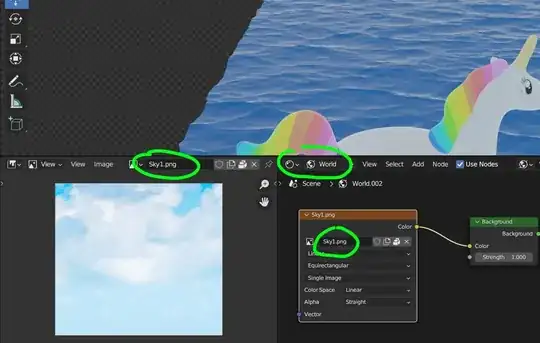
enter image description here

If you want a different HDRI for the reflection, so that the sea is affected by an HDRI and the object is affected by another HDRI, you can mix 2 HDRIs and use an Input > Light Path > Is Reflection Ray as Factor:

enter image description here

moonboots
  • 155,560
  • 7
  • 105
  • 171
  • Thanks. I'm pretty new at this and I can't figure out what you're talking about. How do I fix this? What window should I be in and what do I adjust? – Schming Jul 23 '23 at 19:53
  • You need to change the HDRI you're using, open the Shader Editor, switch it to World instead of Object, and in the Environment Texture node, load a new image (or paint on the image that is used, as I did) – moonboots Jul 23 '23 at 19:57
  • I did what I think you said and it just darkens everything. I added a 100000w point light and it still won't get clear with good highlights. Even what you did, the image is still dull with no highlights like in the first image. I've used this exact same water with other appended objects and there's no problem. How do I get the unicorn to look like the first image? Thanks for helping. – Schming Jul 23 '23 at 23:32
  • could you please pack your image (File > External Data > Pack Resources) and share again? – moonboots Jul 24 '23 at 06:09
  • thanks, I've edited my answer, you have not change the HDRI image, you need to upload another one, the current one won't create any shadow as it is 360° bright – moonboots Jul 24 '23 at 20:42
  • When I change the HDRI image it changes the colour etc. of the water. I have that water in too many scenes to change it now. Thanks for your effort. (o: – Schming Jul 26 '23 at 00:17
  • @Schming In that case maybe read my edit – moonboots Jul 26 '23 at 09:16