I have a mesh that has been created in MakeHuman. I have imported it into blender to apply some python scripts on it. But, they require that the mesh must be triangular. So, my question is, is there any way to convert from quad to triangular mesh in blender or even MakeHuman?
Asked
Active
Viewed 2,017 times
1


-
Ctrl-T in edit mode – Jaroslav Jerryno Novotny May 14 '15 at 14:25
-
1@RayMairlot This question has a lot more answers, that are missing on the proposed duplicate. Should we reverse the duplicate direction? – J Sargent May 14 '15 at 14:55
-
1@NoviceInDisguise This does have more answers, but then in my answer I show 2 methods. It's a similar amount of information just in a different number of answers, so I'm not really sure. Can always flag this question and ask a mod. – Ray Mairlot May 14 '15 at 15:06
3 Answers
5
Select your object. Enter edit mode (Tab) and press ctrlT to tirangulate.

The tools has a few options:
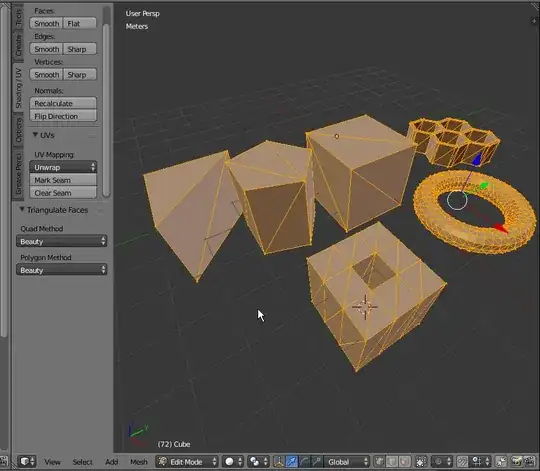
Beauty Split the quads in nice triangles, slower method.
Fixed Split the quads on the 1st and 3rd vertices.
Fixed Alternate Split the quads on the 2nd and 4th vertices.
Shortest Diagonal Split the quads based on the distance between the vertices.
5
While, in your case, cegaton's answer is likely simpler, just for completeness there's also the Triangulate modifier:

After applying the modifier and going into Edit mode, the cylinder looks like this:

5
And to complete the answers: You don't have to triangulate the mesh for python at all if you don't care about vertex order..you can use something like mesh.tessfaces which will represent your polygons triangulated.

Jaroslav Jerryno Novotny
- 51,077
- 7
- 129
- 218