0

I need to wrap a bunch of ropes to some ship masts. The first one went smooth. I'm having problem repeating the same process for the second. Origin of bezier and mesh is the same, transform applied (apart from location that is messing up my mesh that is created with a screw mod). I just don't understand why the mesh is just going straight, no matter what. Any ideas?

Thanksenter image description here

emablender
  • 25
  • 6
  • 1
    https://blender.stackexchange.com/questions/65567/problems-with-curve-modifier/65571#65571 – Duarte Farrajota Ramos Jan 29 '24 at 11:53
  • Thank you @DuarteFarrajotaRamos, I didn't know about that post, it is very helpful! Still, I have all of that done already, but still can't find the solution as to why the mesh just goes plain straight – emablender Jan 29 '24 at 12:25
  • Hard to tell from your explanations. You say the origins are the same, but maybe the mesh is oriented in the wrong direction...? The mesh needs to be oriented in the curve's local +X direction to be following the curve. A completely straight mesh pointing away from the curve looks like it is oriented in the curve's -X direction. – Gordon Brinkmann Jan 29 '24 at 13:11

1 Answers1

2

Your explanations and screenshot sound as if the mesh is oriented in the wrong direction. To have a mesh being deformed along the curve, it has to be oriented in the curve's local +X direction.

It does not matter if the mesh object is rotated in a different direction than the curve, as long as the mesh which you want to be deformed by the curve extends in the same direction as the curve's local coordinates are oriented.

An example: in the following image there is a curve without any transformations, everything oriented along with the global coordinates. The same goes for the mesh object. All transforms are applied and the mesh extends in +X direction.
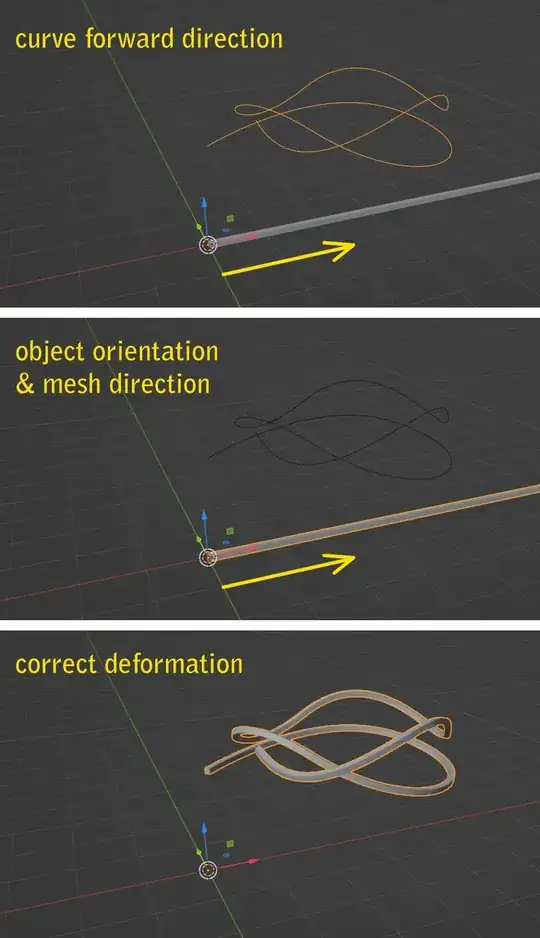
standard orientation

Now what appears to be your problem is the following: your mesh and your curve are oriented in the opposite direction. As you can see in the example below, although the curve object and the mesh object are oriented in the same direction, the mesh extends into the opposite direction. Therefore it is not deformed along the curve, but pointing away from it. Actually it is not really pointing away, it is just that the mesh is placed "before" the curve, and since there is no more curve to be deformed with, it is just straight along the tangent of the curve's starting point. Same happens with meshes that are too long for a curve. Everything after the curve is just pointing straight into the end point's tangent direction.

mesh in opposite direction

The thing is, as long as your mesh is extended in the same direction as the local +X or "forward" direction of curve, it will be deforemd along the curve, no matter which orientation the object containing the mesh has.

arbitrary object rotation

The only other important thing is, to not have a strange offset: the part of the mesh, which you want to be at the starting point of the curve, has to be at the origin of the curve. It is not even necessary for the mesh object to have the same origin as the curve, as long as the mesh is there it will always begin deforming at the curve's starting point.

arbitrary object rotation & location

Gordon Brinkmann
  • 28,589
  • 1
  • 19
  • 49
  • Thanks! This helped! I try to explain why. The main reason for my problem was that I created the bezier curve out of some curve shapes + drawing curve. There were 2 parts that failed to connect, but with vertexes near enough for me not to realize. The mesh was then sitting in that bit of the smaller curve and, this is the point where you really helped me, it was extending past it. For this reason, as you explained, was going straight, because the curve was finishing as it was not connected with the rest. Cheers – emablender Jan 29 '24 at 15:02
  • 1
    @emablender Ah I see, good to know. As I said, it was not 100% clear from the question, there could have been other reasons as well. But most of the time when a mesh should be deformed but just goes straight it is because it is either "before" the or "behind" the curve and there is no curve to deform along with. – Gordon Brinkmann Jan 29 '24 at 15:06