How can I replace the background of my scene, but keep the reflections and lighting generated from my HDRI?
Asked
Active
Viewed 1.5k times
4

-
1Render with transparent film. Go to Render Settings>Film and check the Transparent checkbox – J Sargent May 26 '15 at 15:22
-
possible duplicate of Can Blender render pngs with the background transparent? – J Sargent May 26 '15 at 15:48
-
4@NoviceInDisguise Not a duplicate as far as I can see, at least not of that question: http://meta.blender.stackexchange.com/questions/549/duplicate-answer-vs-duplicate-question – Ray Mairlot May 26 '15 at 16:50
1 Answers
2
Enable Transparent in Render settings > Film:

Now the sky will render as alpha transparency when seen directly, but still illuminate and reflect off other objects.
Once you have a transparent background, it can easily be filled in with another image via an Alpha Over node:
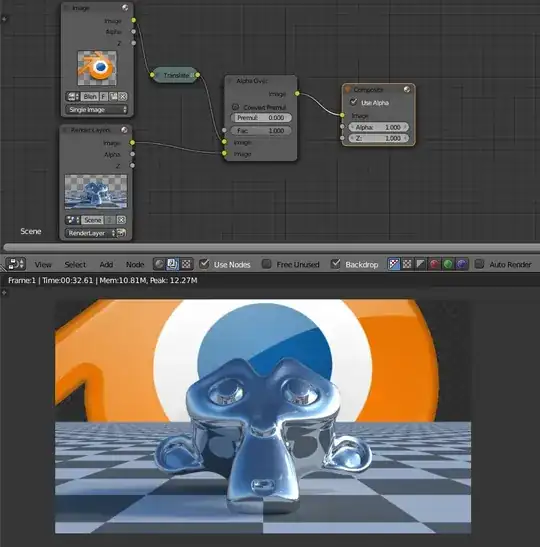
The Translate node is used for some tweaks to the positioning of the background image.

gandalf3
- 157,169
- 58
- 601
- 1,133
-
3Maybe it would be good to include a bit of information regarding compositing work involved. After all, the question was not about how to get a transparent background, but how to change the background without effecting the scene. – TARDIS Maker Jun 03 '15 at 07:07
-
Much better! Although for simplicities sake, I would get rid of the translate node, but that's just me. – TARDIS Maker Jun 05 '15 at 07:23
-
This was not helpful to me, can anyone please provide an video tutorial – Ehsan Zargar Ershadi Jun 15 '18 at 17:35
-
@EhsanZargarErshadi What is unclear? I can't really help unless I know where you're stuck. – gandalf3 Jun 15 '18 at 20:41
-
Sorry, my lake of knowledges where the issue, buy looking precisely to the images provided I was able to reproduce it. Thanks – Ehsan Zargar Ershadi Jun 17 '18 at 06:08
-
-
Does this have to be made in the compositor? You can't do it straight in a world material so you can see it in the viewport? – eobet Mar 04 '21 at 12:56
-
@eobet Hm.. I think you could do it in a world material, yes. If you'd like to ask another question, comment a link to me here and I'll see if I can figure something out! (If you're still looking for a solution) – gandalf3 Mar 05 '21 at 23:17
-
1Thanks, found the answer here already actually (although the result gets slightly distorted): https://blender.stackexchange.com/a/145396/38603 – eobet Mar 06 '21 at 14:52
-
@eobet I'm glad! To solve the distortion you could try connecting a texture coordinate node (window) -> mapping node -> vector input of your image texture node. – gandalf3 Mar 07 '21 at 00:50