4

tank track curve modifier

I have used a cube with a curve modifier and array modifer to run create a set of tracks for a tank model.

My problem is that the cube appears to be at a slight angle and I can not work out why.

There is no rotation on the cube itself so I am not sure where the rotation is coming from.

kenjara
  • 143
  • 6
  • 2
    I think the curve is probably co-planar, but perhaps the Cube has been deformed - maybe some of vertices of the cube have been translated - it's hard to say. care to share the .blend? – zeffii Jun 19 '15 at 13:22
  • @zeffii I have added the blend file. I am still fairly new to blender and 3D modelling so I could of done something silly by accident. – kenjara Jun 23 '15 at 11:16
  • 1
    Related: http://blender.stackexchange.com/q/5910/599, http://blender.stackexchange.com/q/510/599, and http://blender.stackexchange.com/q/6486/599 – gandalf3 Jun 23 '15 at 11:31
  • 1
    I don'q quite get how your base object was straight, as it is looking like that - http://i.imgur.com/sb7tAMT.jpg (all modfiers turned off). If adding another cube / editing this one (but fiirst is easier), then it'll work - http://i.imgur.com/9MpX1FB.png. So @zeffii was right saying that the cube was deformed. – Mr Zak Jun 23 '15 at 11:41
  • Thanks guys I am not sure how I managed to sheer it but I must have somehow by accident. – kenjara Jun 24 '15 at 10:45
  • @zeffii It turns out I did not shear it but fell into another newbie trap. I have worked out why the cub was getting angled like that. The reason is after resizing my cube I did not recenter the origin. The origin of the curve was also off so that did not help. I centered both on mass and that sorted it. – kenjara Jun 25 '15 at 11:07

2 Answers2

3

As is the case with any sufficiently complex thing, it takes time for all of this to become internalized / second nature.

In your situation, the base object (the deformed cube) was not just scaled to become elongated, but at some point you also translated one of the faces giving the base object the sheered look. This is one reason to use multiple views of your object to help catch deformations which might be tricky to see from just a perspective view. (Over time you will see all of this immediately.. but it takes practice)
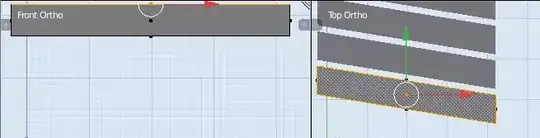
enter image description here

Once you correct the sheer (best just to use a new object, or learn how to snap edges to the (x,y,z) coordinates of other vertices) , you'll still get deformation in those parts of the track which bend a lot. This might be OK if you're aiming for non-photo-realism, else there are hefty tutorials for tank tracks.


zeffii
  • 39,634
  • 9
  • 103
  • 186
  • Thanks. The multiple views is a good point and something I will start doing. It makes sense as I as mainly looking at the object from the side before applying the modifiers which means that I would of missed it. – kenjara Jun 24 '15 at 12:23
1

It's trying to follow the curve the best it can, and deforming the mesh in the process. You could use a vertex group to limit the influence of the curve modifier, but I think you'd still get deformation.

The best way to eliminate the angle deformation would be to straighten the curve. Go into Edit mode, select all vertices with A, and scale to 0 by X axis (S > X > 0).

If you do need the curve to go into that angle, you could try using dupliverts.

Mr Zak
  • 10,848
  • 4
  • 28
  • 77
Januz
  • 271
  • 1
  • 5
  • Thanks Mr Zak, I was wondering how to do those key icons – Januz Jun 19 '15 at 15:04
  • 1
    You might want to check this post http://meta.blender.stackexchange.com/questions/388/button-to-insert-kbd-kbd-for-users/391#391 – Mr Zak Jun 19 '15 at 15:12
  • I tried this and nothing moved at all. I believe I had already straightened the curve on the x axis. I have added the blend file to the question if you want to take a look. Thanks. – kenjara Jun 23 '15 at 11:20
  • Looking at your blend, your base object is deformed like @zeffii said. Try a straightened cube – Januz Jun 23 '15 at 14:19