0

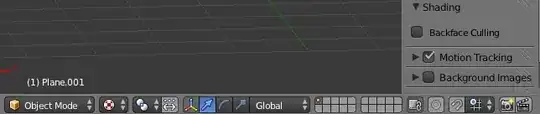
when I press 'N' I'm supposed to find a 'shadeless' option under shading, but I cant seem to make it appear. I've tried hard to find a solution but there doesn't seem to be one.

Here's how it's supposed to look like

shadeless

and here's how mine looks like no shadeless

Thank you in advance.

  • 1
    What version of blender are you using? In 2.76b I get that option when in Texture Shading on the 3D viewport is enabled: http://i.stack.imgur.com/jrCKL.png –  Nov 28 '15 at 08:26
  • I'm using version 2.69. I believe my issue is solved by using emission shader in Material shading. – Needofhelp11 Nov 28 '15 at 08:42
  • @Needofhelp11 if you found a solution please write it up as an answer https://blender.stackexchange.com/help/self-answer –  Nov 28 '15 at 08:44
  • I actually found it as an answer here https://blender.stackexchange.com/questions/10942/is-there-a-textured-but-unlit-full-bright-viewport-mode I had missed what was said at the bottom earlier. – Needofhelp11 Nov 28 '15 at 08:49

0 Answers0