9

I'm getting this error often, and I'm fairly new to blender and I'm not sure if this is the same thing as the Auto-run disabled issue, but I can't finish my project with this error in the way.

It says:

ERROR: Python auto-execution disabled.

error message

How can I fix this problem?

David
  • 49,291
  • 38
  • 159
  • 317
Akidus
  • 417
  • 3
  • 8
  • 14

1 Answers1

17

This might solve it, check here: https://www.blender.org/manual/advanced/scripting/python/security.html (Updated: https://www.blender.org/manual/advanced/scripting/security.html 10.23.16)

Relevant text as follows:

Setting Defaults

In the File tab of the User Preferences, there is the toggle Auto Run Python Scripts.

This means the Trusted Source option in the File Browser will be enabled by default, and scripts can run when blend-files are loaded without using the File Browser.

Once enabled you have the option to exclude certain directories, a typical configuration would be to trust all paths except for the download directory.
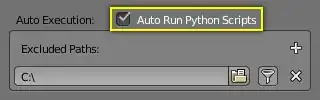
Auto Execution: Auto Run Python Scripts

Tom
  • 286
  • 2
  • 6
  • 2
    Please try to include some more information. Link-only answers have the problem that if the link disappears your answer will make no sense (and even the blender manual has changed links in the past). –  Feb 14 '16 at 06:25
  • I looked for around bit and the default setting option did the trick. I was using it in the graph editor. Thanks. – Akidus Feb 14 '16 at 06:27