Try creating a material.
Blender internal:
Create a material in Properties > Materials panel:

To simply add some color, you probably want to set the Diffuse color instead of the object color:
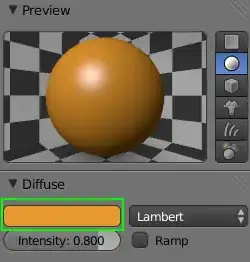
Object color only affects the render when enabled in Material > Options:

Object color is used to add some color variance per object without adding new materials.
Cycles:
AFAIK, Object color is not used at all in cycles.
Render:
To give an object a color in the render for cycles:
Create a new material in the Materials panel by pressing Add new:
This will automatically add a Diffuse shader.
Adjust the Color input of the diffuse shader:

Viewport:
To give the object a color in the 3D view set the Viewport color in Properties > Materials > Settings > Viewport color:

Note that the Viewport color is separate from the colors defined in the material which will appear when rendered. (It will only affect the 3D view)


