13

edit 2 years later: Here is an alternative answer that meets the desired end-result using FreeStyle.


Is there a way to make the wireframe input show the geometry as BMesh polygons instead of the raw triangulated mesh? The example below displays the wireframe of a mesh in edit mode (as you can see it doesn't have any triangles).
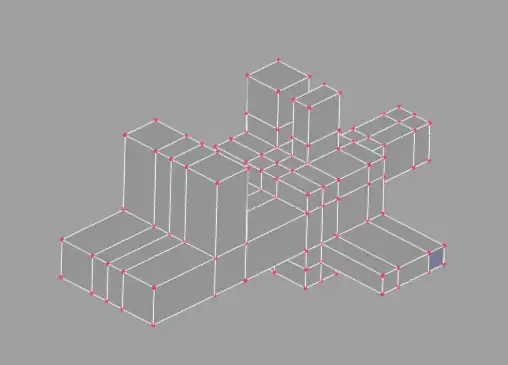
enter image description here

When I render the mesh it appears triangulated, but being able to show quads and ngons (instead of only tris) would be more useful to me.
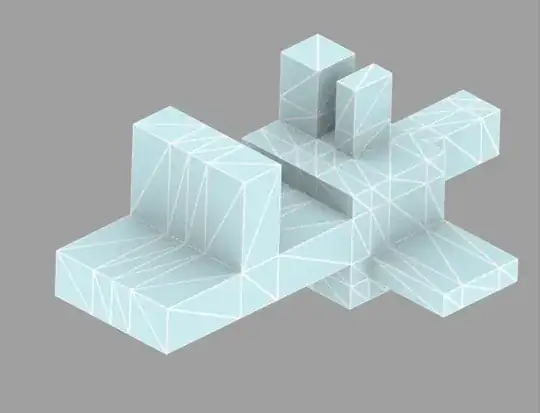
enter image description here

zeffii
  • 39,634
  • 9
  • 103
  • 186
  • Which wireframe material is this? Can you link to it please? – CharlesL Jun 03 '13 at 21:35
  • it's a mix of wireframe input and ambient occlusion shader. nothing special. https://dl.dropboxusercontent.com/u/3397495/blender_related/quantize_and_normalize.blend – zeffii Jun 03 '13 at 21:42
  • 5
    @zeffii had a look around, this might be what you are looking for, I didn't go through it yet tho. http://www.blendswap.com/blends/view/41864 – iKlsR Jun 03 '13 at 21:46
  • @iKlsR that does look promising! – zeffii Jun 03 '13 at 21:50
  • One of the Techniques (UV Based) of the .Blend file on Blendswap is explained here https://www.youtube.com/watch?v=zjhdGY21WqQ But it didnt work out for me, as the Lines get drawn in different Thickness acording to their Face-side ratio.
    With fairly even distributes equally sized Polygons its working quite good. Hope that helps
    – Damir Jun 03 '16 at 10:15

3 Answers3

7

As of yet it hasn't been implemented. Although there was no specific mention of improving the wireframe node, Thomas Dinges is working on some Cycles things this GSoC. I think it's just a matter of time before he, or another developer, gets to it.

Greg Zaal
  • 10,856
  • 3
  • 47
  • 86
  • quite right, I look forward to seeing something more convenient than the old methods. – zeffii Jun 06 '13 at 08:22
  • The other answers don't look great rendered, I'm OK with this answer in the negative for now. I will submit an alternative but leave this one accepted. – zeffii Jun 15 '13 at 12:30
2

I think this is what you want(iKlsR also mentions this in the comments): http://www.blendswap.com/blends/view/41864

The .blend file contains a wireframe shader for both quads and triangles.

CharlesL
  • 15,316
  • 7
  • 53
  • 88
1

In the mean time here's one workaround that doesn't require UVs:

Note that you have to activate Auto Smooth and set it to 0° (don't ask me why)

enter image description here

ChameleonScales
  • 2,510
  • 13
  • 33
