8

Within my game I have some cubes with text which render fine. In addition to the cubes I want to display some static text, e.g. the current score. The score text has the camera as parent and a copy rotation constraint on the camera.

While this concept works fine in principle, the score text is displayed very pixelated. I already increased the font size to 50 and made the text smaller by scaling it down, but it still doesn't show nicely.

The score text is about 11 Blender units away from the camera. If I move the score text further away, it displays better, but then the text interferes (collides) with the cubes.

What could I do to improve the quality of this text?

Download SSCCE .blend file. Open the SSCCE in Blender 2.70. Hover your mouse over the 3D viewport. Press P to start game engine.
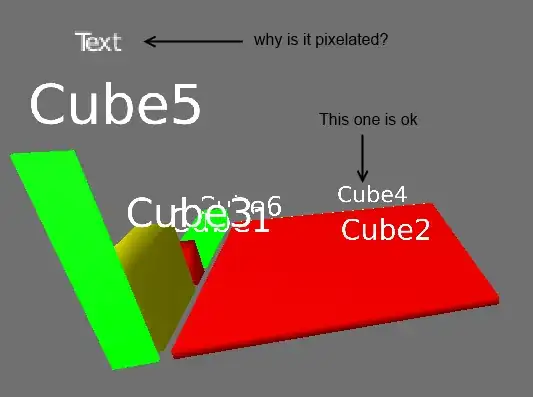
Screenshot

Thomas Weller
  • 1,124
  • 12
  • 25

2 Answers2

7

You can fix the resolution through the python API:

import bge

scene = bge.logic.getCurrentScene()
for obj in scene.objects:
    if obj.name == "Text": # text object we want to fix
        obj.resolution = 8.0 # resolution is normaly 1.0 / 72 dpi
user2859
  • 3,612
  • 21
  • 21
  • This does the trick. Is this setting not availabe in the UI, only in Python? – Thomas Weller Apr 08 '14 at 14:56
  • See my comment on your question. Its a bit of a hack right now. The other method will work better I think. – user2859 Apr 08 '14 at 14:57
  • Hi! Could you recommend me a good resolution for my text so it looks good for my car gauges? – Adrians Netlis Dec 26 '14 at 20:11
  • @AdriansNetlis your car gauges don't need dynamic text, they can be a mesh or an image mapped to plane. – ruckus Apr 05 '15 at 16:52
  • 3
    Please be aware that rendering text at 8x resolution as suggested will take up a LOT more graphic memory. (128x128 will becomes 1024x1024) It will even fail on lesser graphics cards. Use the smallest number you can stand. – Mike Pan Jul 27 '15 at 19:50
  • Addendum to Mike Pan's comment: the "resolution" parameter is scaled by the font objects size, so is better expressed as "100px per blender unit" - so you can crank the "resolution" value really high if you have a tiny font object. (As of looking at source code for BGE 2.78) – sdfgeoff Jul 24 '17 at 14:05
0

It is literally a scaling problem. you cannot scale a text to fit your scene. you must scale your scene to fit the text. never scale down your text from when you first create it. Ill never let the BGE go. its gone from updated Blender. but I will always make games in the BGE. you can get a old copy of Blender from their site. 2.79 was the last version to have the Game Engine. Also to answer your question better. You should probably use an overlay scene for all scoring and other text, that way the text will never collide with anything and you can scale your HUD scene as much as you need. if your text is to big on the screen then just pull your camera away, for HUD style small text I put my cam about 40 Blender Units away from the text

Kenny B
  • 1
  • 1